Trascina e caricaDrag and load
Trascina i documenti nella coda oppure selezionali da una cartella locale.Drag documents into the queue or choose them from a local folder.
RicevutaTelematica controlla le ricevute telematiche XML pagoPA, segnala anomalie strutturali e verifica la coerenza di importi, esiti e campi obbligatori. Carica uno o più file, consulta il riepilogo e l'anteprima, poi esporta un PDF o un archivio ZIP con naming configurabile. Controlli rapidi, risultati chiari, pronta all'esportazione. RicevutaTelematica checks pagoPA XML payment receipts, flags structural issues and verifies amounts, outcomes and required fields. Load one or more files, review the summary and preview, then export a PDF or a ZIP archive with configurable naming. Quick checks, clear results, ready to export.

Valida, consulta ed esporta le ricevute pagoPA direttamente dal browser o da Windows.Validate, review and export pagoPA receipts directly from the browser or on Windows.
Controlla ricevute telematiche XML, segnala anomalie strutturali e verifica coerenza di importi, esiti e campi obbligatori.Checks XML payment receipts, flags structural issues and verifies amounts, outcomes and required fields.
Carica uno o più file, consulta il riepilogo, scorri i documenti e visualizza l'anteprima prima dell'esportazione.Load one or more files, review the summary, browse documents and inspect the preview before export.
Esporta il singolo documento o un archivio ZIP di PDF con naming configurabile e controllo aggiornamenti integrato.Export a single document or a ZIP archive of PDFs with configurable naming and built-in update checks.
Trascina i documenti nella coda oppure selezionali da una cartella locale.Drag documents into the queue or choose them from a local folder.
Segnala anomalie nella struttura XML e verifica campi obbligatori, importi ed esiti.Flags issues in the XML structure and verifies required fields, amounts and outcomes.
Mostra esito, importi, IUV, ente creditore e dettagli degli errori, anche quando il file non risulta valido.Shows status, amounts, payment identifier (IUV), creditor and error details, even when the file is not valid.
Genera il PDF del documento corrente e salvalo con il nome che preferisci.Generate the PDF for the current document and save it with the name you prefer.
Crea un archivio ZIP con i PDF di tutte le ricevute elaborate, con il nome dei PDF configurabile (nome XML originale, con esito o con data e ora).Create a ZIP archive with the PDFs of all processed receipts, with configurable PDF naming (original XML name, with status or with date and time).
Usala dal browser oppure con la versione portatile per Windows, che si associa ai file .xml per aprirli con un doppio clic. Tema chiaro, scuro o di sistema, scorciatoie (Ctrl+O, Ctrl+S, F1), tutorial e controllo aggiornamenti integrato.Use it from the browser or with the portable Windows version, which associates itself with .xml files so they open with a double-click. Light, dark or system theme, shortcuts (Ctrl+O, Ctrl+S, F1), tutorial and built-in update checks.
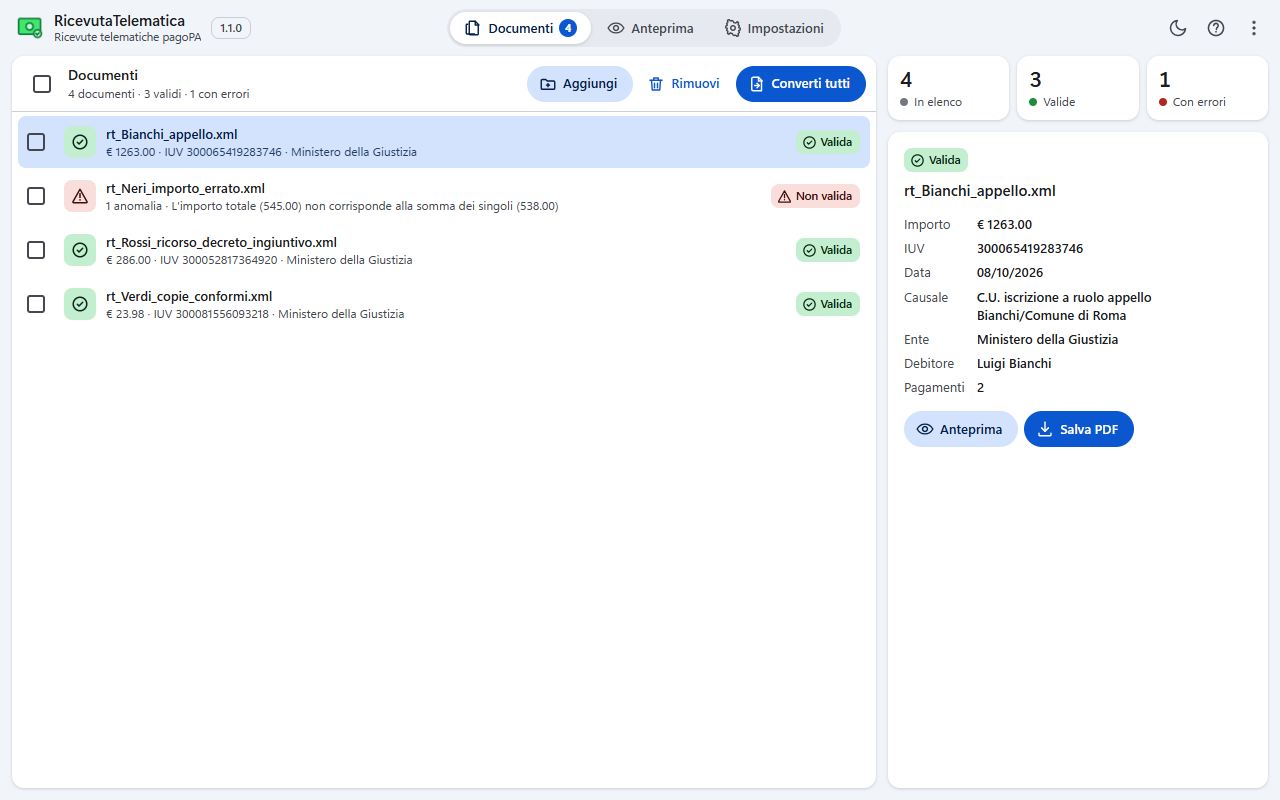
Trascina le ricevute nell'elenco oppure sceglile dal disco: ogni documento mostra subito esito, importo, IUV ed ente, con il conteggio di quelle valide e di quelle con errori.Drag receipts into the list or choose them from disk: each document immediately shows status, amount, payment identifier (IUV) and creditor, with a count of valid receipts and receipts with errors.
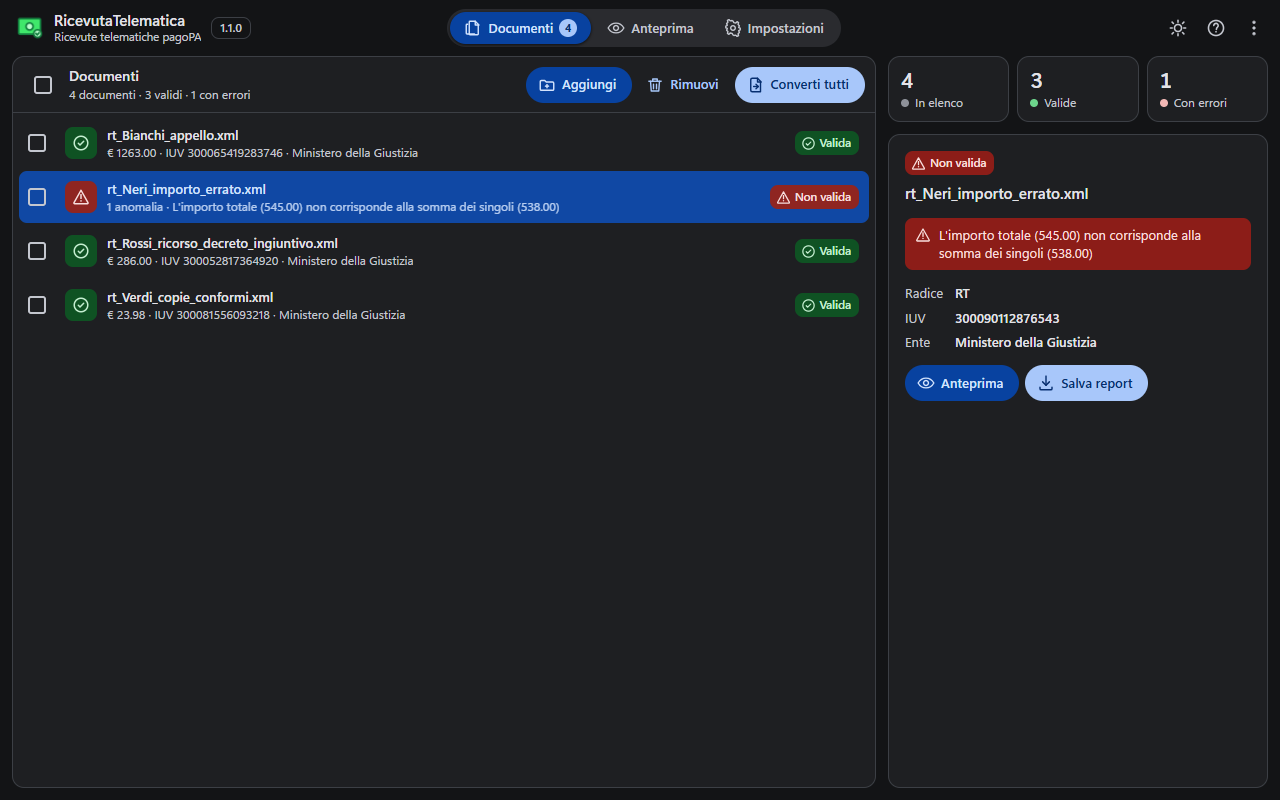
Seleziona un documento per vederne i dettagli: se non è valido l'app indica l'anomalia (qui un importo totale diverso dalla somma dei singoli pagamenti) e il report PDF resta esportabile. Qui con il tema scuro.Select a document to see its details: if it is not valid the app points out the issue (here a total amount that differs from the sum of the single payments) and the PDF report can still be exported. Shown here in dark theme.
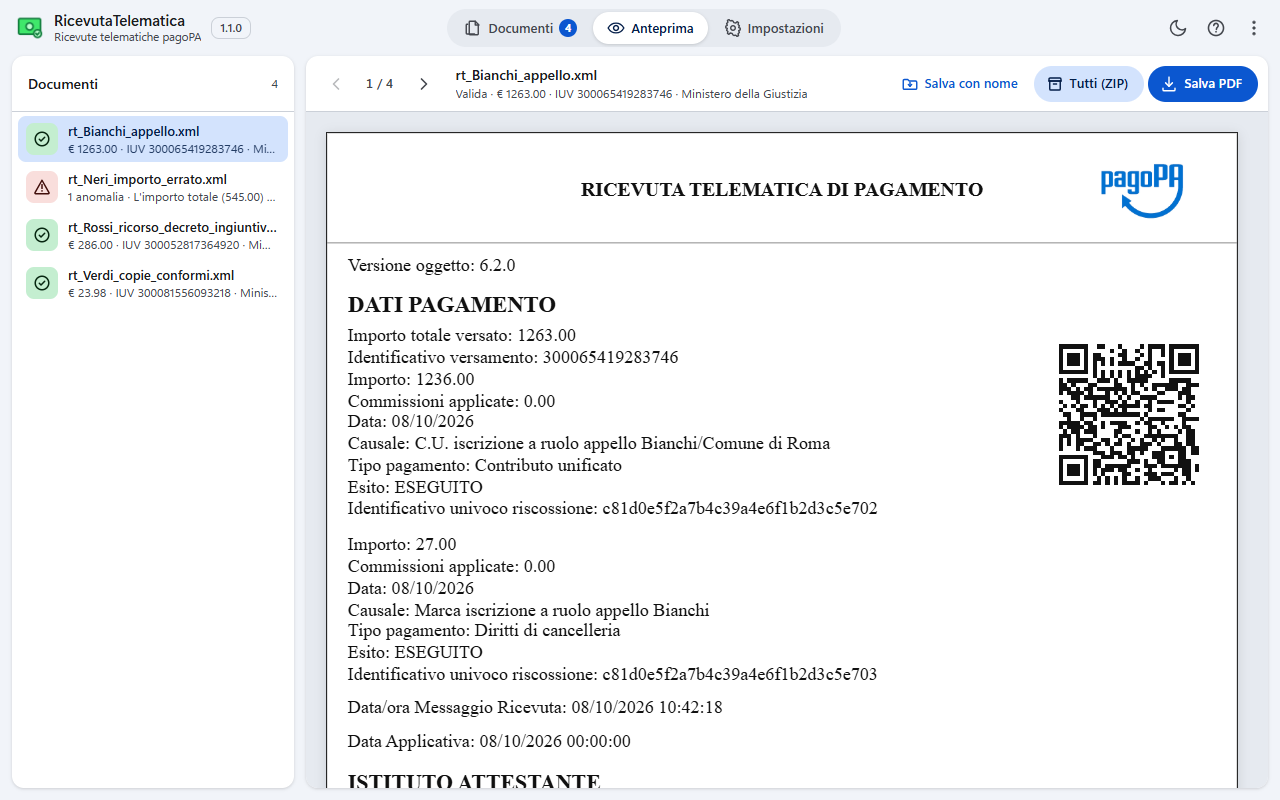
L'anteprima riproduce la ricevuta con logo e QR code pagoPA: salva il PDF del documento corrente, salva con nome oppure crea un archivio ZIP con tutte le ricevute elaborate.The preview reproduces the receipt with the pagoPA logo and QR code: save the PDF of the current document, save it with a custom name or create a ZIP archive with all processed receipts.
Il canale consigliato per Windows è Microsoft Store: installazione e aggiornamenti automatici sono gestiti direttamente dallo Store. The recommended channel for Windows is Microsoft Store: installation and automatic updates are handled directly by the Store.
Apri RicevutaTelematica nel Microsoft StoreOpen RicevutaTelematica in Microsoft Store PrestoSoonVersione Windows portatile e universale (x86/x64): estrai l'archivio in una cartella e avvia l'eseguibile, senza installazione. Portable and universal (x86/x64) Windows version: extract the archive to a folder and run the executable, no installation required.
Scarica RicevutaTelematica per WindowsDownload RicevutaTelematica for WindowsApri l'app all'indirizzo https://agap.it/RT/ per caricare XML, validare ricevute ed esportare PDF direttamente dal browser. Open the app at https://agap.it/RT/ to load XML files, validate receipts and export PDFs directly from the browser.
Apri RicevutaTelematica nel browserOpen RicevutaTelematica in the browser