SpeDiGius Check • lsg.giustizia.it • Windows

Sai subito quali istanze sono passate a lordo esecutivo Know at once which requests reached approved gross

SpeDiGius Check accede al portale ministeriale lsg.giustizia.it con la tua CIE, esporta uno per uno tutti gli elenchi delle istanze di liquidazione spese di giustizia e li confronta con lo storico locale. Con un clic su «Aggiorna ora» scopri le istanze nuove, quelle diventate lordo esecutivo o non valide e ogni cambio di stato, senza dover aprire e scorrere a mano ogni elenco. Pensata per avvocati, consulenti tecnici, interpreti e professionisti che presentano istanze di liquidazione. SpeDiGius Check signs in to the Italian Ministry of Justice portal lsg.giustizia.it with your CIE (electronic ID card), exports every list of court-fee payment requests one by one and compares them with your local history. One click on "Aggiorna ora" shows you new requests, those that became approved gross ("lordo esecutivo") or invalid, and every status change, without opening and scrolling through each list by hand. Built for lawyers, court experts, interpreters and professionals who file payment requests.

✓ Accesso con CIECIE sign-in ✓ Storico e dati solo sul tuo PCHistory and data only on your PC ✓ Gratuita per uso personaleFree for personal use
SpeDiGius Check AGAP
SpeDiGius Check - monitor delle istanze di liquidazione spese di giustizia
Niente più controlli manualiNo more manual checks

Il portale lo controlla l'app, tu leggi solo le novitàThe app checks the portal, you only read what changed

Chrome lavora in background senza rubare il focus: tu continui a lavorare.Chrome works in the background without stealing focus: you keep working.

🔑

Accesso con CIECIE sign-in

Il QR code del portale compare nella finestra dell'app con il tempo di validità: lo inquadri con l'app CieID e il resto lo fa SpeDiGius Check. La sessione viene ricordata, quindi di solito i controlli successivi non richiedono un nuovo accesso.The portal's QR code appears in the app window with its validity countdown: scan it with the CieID app and SpeDiGius Check does the rest. The session is remembered, so later checks usually need no new sign-in.

🔔

Solo ciò che è cambiatoOnly what changed

Ogni controllo viene confrontato con lo storico: istanze nuove, passaggi tra elenchi, cambi di stato e uscite. Scegli tu quali elenchi segnalare come novità (predefiniti: lordo esecutivo e non valide).Each check is compared with the history: new requests, moves between lists, status changes and exits. You choose which lists count as news (default: approved gross and invalid).

🔒

Dati sul tuo PCData on your PC

Lo storico, gli Excel scaricati e i PDF restano sul tuo computer. L'unico sito contattato è lsg.giustizia.it, tramite il tuo Chrome o Edge: nessun server intermedio.History, downloaded Excel files and PDFs stay on your computer. The only site contacted is lsg.giustizia.it, through your own Chrome or Edge: no intermediate servers.

FunzionalitàFeatures

Tutti gli elenchi di Istanza WEB sotto controlloEvery Istanza WEB list under control

🗂️

7 elenchi monitorati7 lists monitored

In bozza, in attesa, in carico, lordo esecutivo, netto in lavorazione, netto pagato e non valide. Gli elenchi che il portale indica come vuoti vengono saltati.Draft, pending, in progress, approved gross, net in progress, net paid and invalid. Lists the portal reports as empty are skipped.

📥

Export completo e verificatoComplete, verified export

Ogni elenco viene esportato in Excel pagina per pagina e confrontato con le righe mostrate dal portale: se non coincidono l'export viene ripetuto. Le letture parziali non generano mai false «uscite».Each list is exported to Excel page by page and checked against the rows shown by the portal: if they differ the export is repeated. Partial reads never create false "exits".

📊

Riepilogo a colpo d'occhioSummary at a glance

Schede con lordo esecutivo, non valide, novità da vedere e ultimo controllo, più i contatori di Istanza WEB con la variazione rispetto al controllo precedente.Cards for approved gross, invalid, unseen news and last check, plus the Istanza WEB counters with the change since the previous check.

🔎

Schede o tabella, con ricercaCards or table, with search

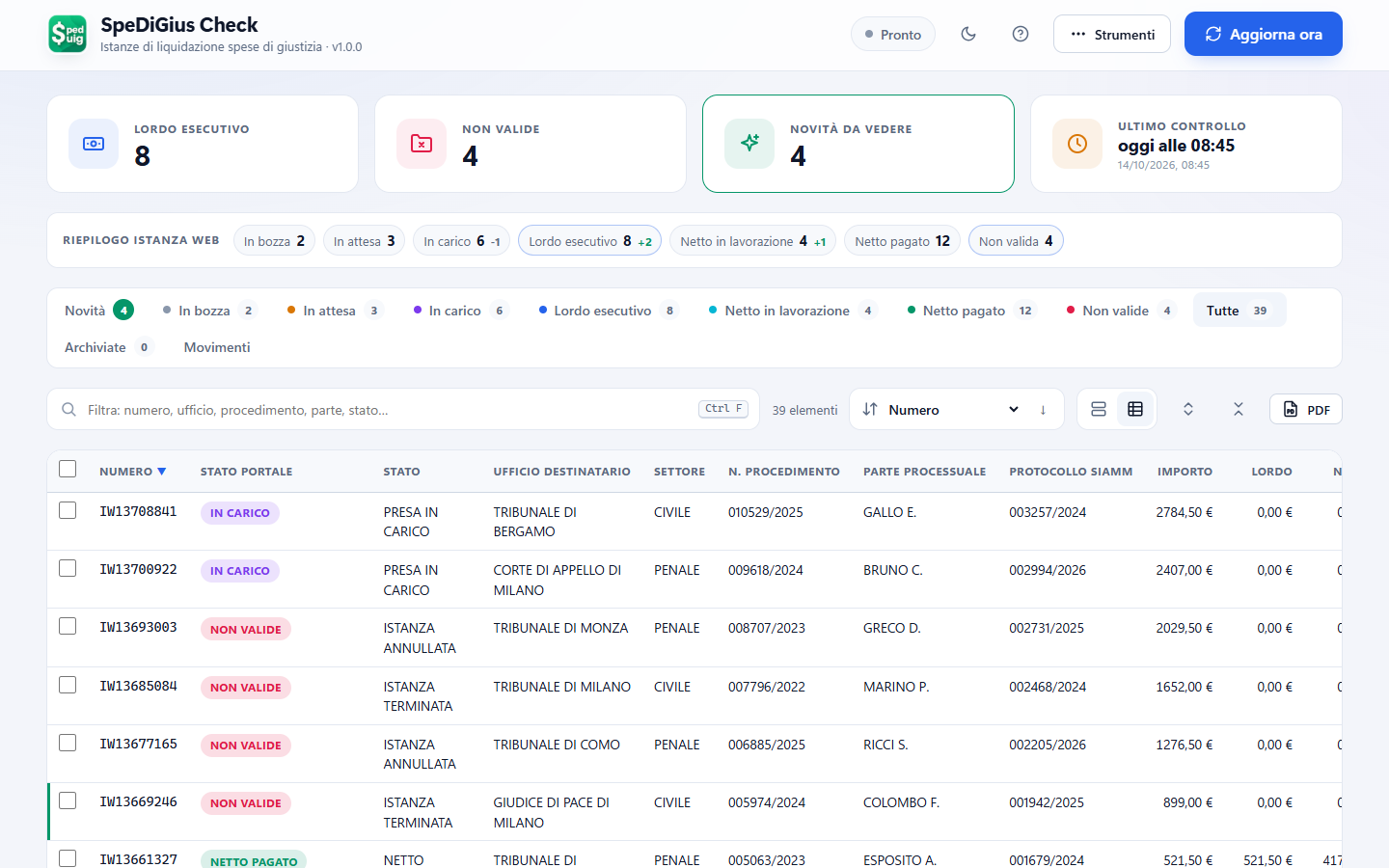
Vista a schede o lista dettagli, filtro istantaneo con evidenziazione (Ctrl+F) e ordinamento intelligente di numeri di procedimento, protocolli SIAMM, importi e date.Card or detail-table view, instant filter with highlighting (Ctrl+F) and smart sorting of case numbers, SIAMM protocol numbers, amounts and dates.

🧾

PDF, archivio e movimentiPDF, archive and movements

Esporta in PDF l'elenco corrente o la singola istanza con la sua cronologia, archivia le istanze già gestite e consulta il registro completo dei movimenti.Export the current list or a single request with its timeline to PDF, archive the requests you have handled and browse the full movement log.

🛟

Storico sicuroSafe history

Salvataggio atomico con copia di sicurezza, export e import dello storico in JSON, log consultabile, tema chiaro o scuro e uscita dal portale con cancellazione della sessione.Atomic saves with a backup copy, history export and import as JSON, viewable log, light or dark theme and portal sign-out that clears the session.
Screenshot

SpeDiGius Check in usoSpeDiGius Check in action

Le schermate mostrano dati di esempio inventati.Screenshots show made-up sample data.

SpeDiGius Check - novità dopo il controllo

Le novità in evidenzaNews in the spotlight

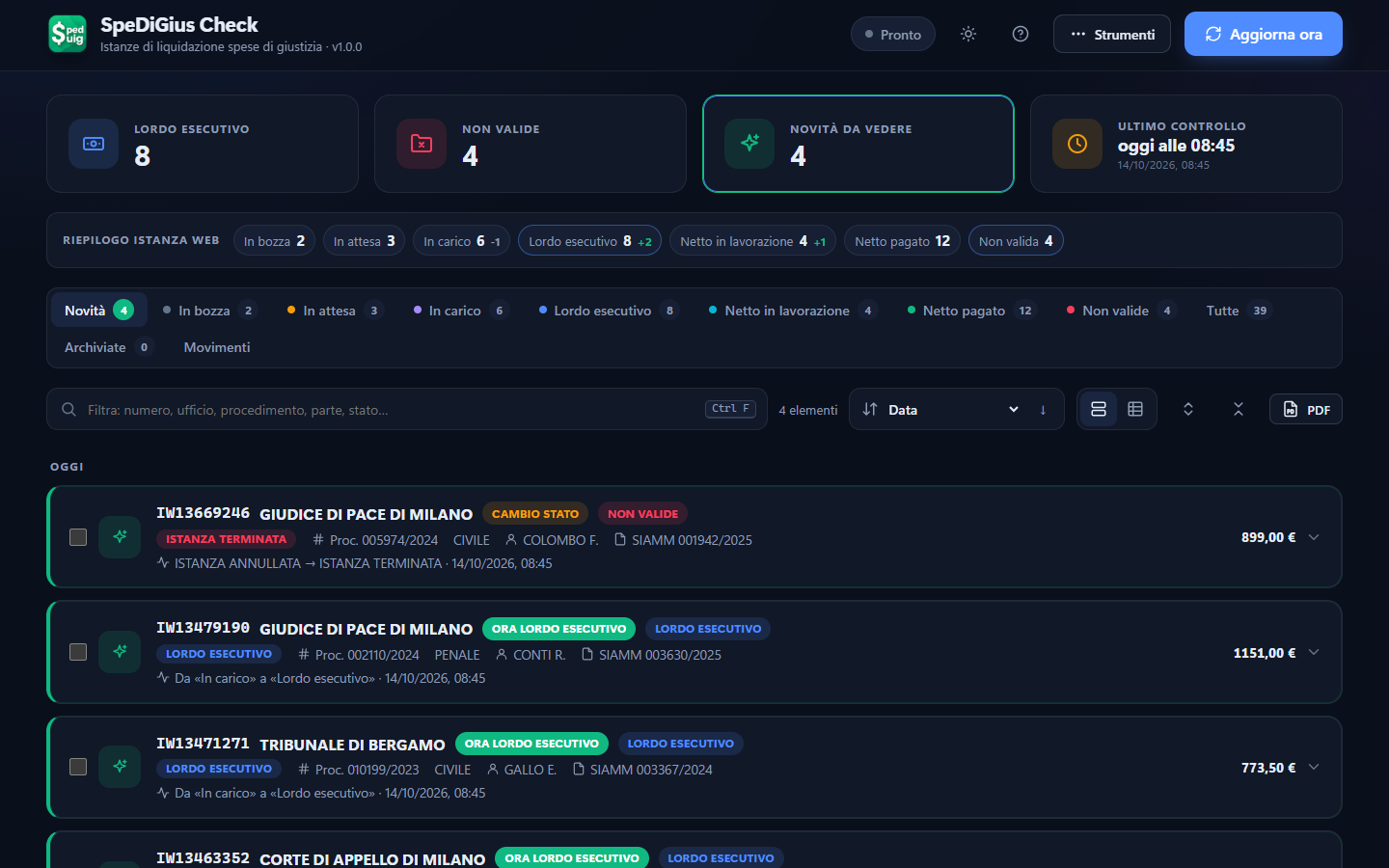
Dopo «Aggiorna ora» la scheda Novità mostra le istanze passate a lordo esecutivo e i cambi di stato, con provenienza, ufficio, procedimento, SIAMM e importo.After "Aggiorna ora" the News tab shows requests moved to approved gross and status changes, with origin, office, case number, SIAMM number and amount.

SpeDiGius Check - tutte le istanze in tabella

Tutte le istanze in tabellaAll requests in a table

La lista dettagli raccoglie tutte le colonne del portale, ordinabili e filtrabili; seleziona più istanze per archiviarle o esportarle in PDF.The detail list gathers every portal column, sortable and filterable; select several requests to archive them or export them to PDF.

SpeDiGius Check - registro dei movimenti

Registro dei movimentiMovement log

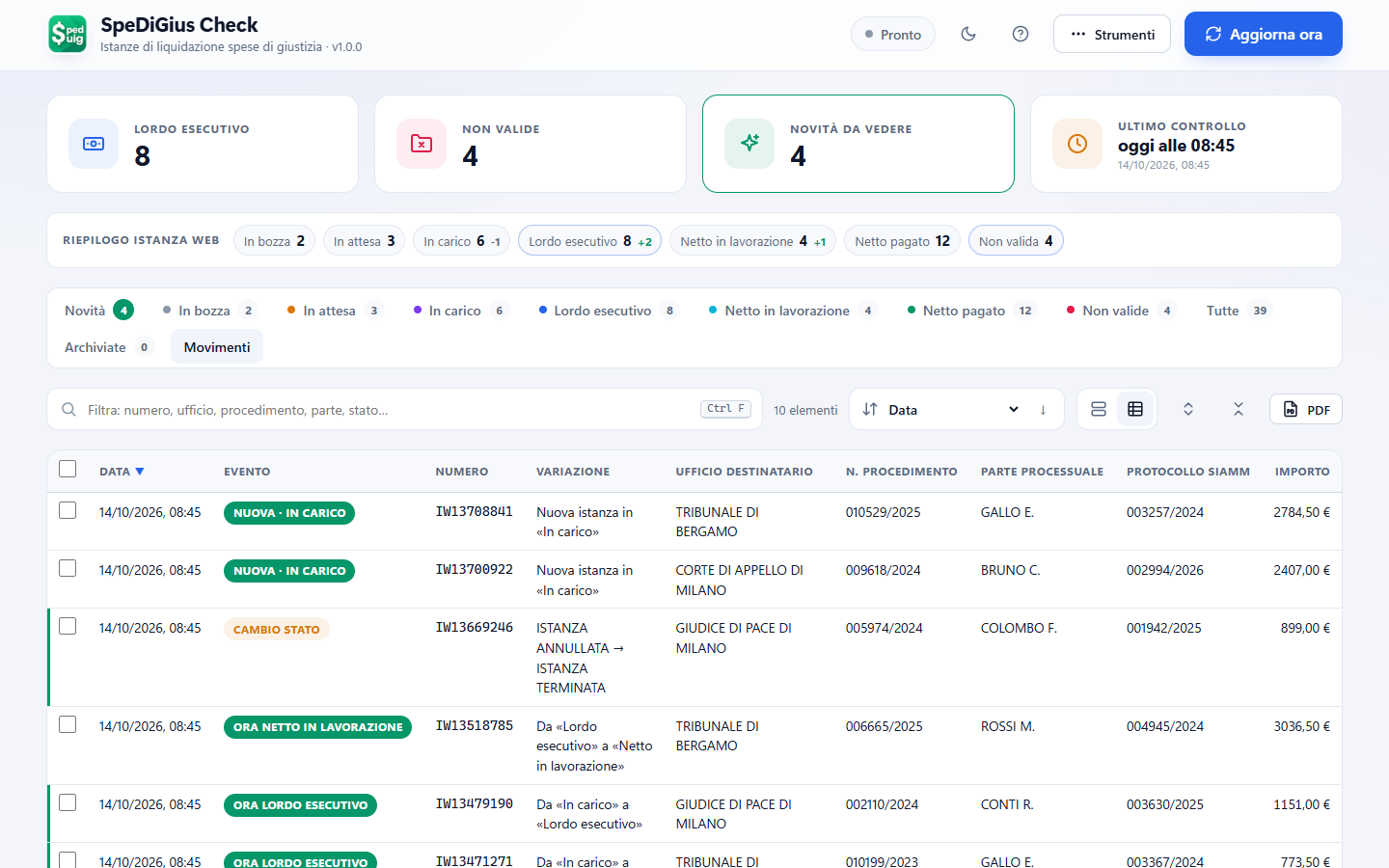
Ogni variazione rilevata resta nello storico: nuove istanze, passaggi tra elenchi e cambi di stato, con data e ora del controllo.Every detected change stays in the history: new requests, moves between lists and status changes, with the date and time of the check.

Download

Scarica SpeDiGius CheckDownload SpeDiGius Check

Windows - ZIPWindows - ZIP

Estrai l'archivio in una cartella e avvia l'eseguibile. Requisiti: Windows 10 o 11, Node.js 20 o successivo e Google Chrome o Microsoft Edge installati. Interfaccia in italiano. Extract the archive to a folder and run the executable. Requirements: Windows 10 or 11, Node.js 20 or later and Google Chrome or Microsoft Edge installed. Italian user interface.

Scarica SpeDiGius Check per WindowsDownload SpeDiGius Check for Windows

Prima di iniziareBefore you start

Serve un account abilitato su lsg.giustizia.it e l'app CieID sullo smartphone per l'accesso con CIE. SpeDiGius Check è uno strumento indipendente, non affiliato al Ministero della Giustizia: legge solo ciò che vedresti accedendo tu stesso al portale. You need an account enabled on lsg.giustizia.it and the CieID app on your smartphone to sign in with CIE. SpeDiGius Check is an independent tool, not affiliated with the Italian Ministry of Justice: it only reads what you would see by signing in to the portal yourself.