@count • Windows • Open Banking PSD2 • Sola lettura @count • Windows • PSD2 Open Banking • Read-only

Le notifiche dei tuoi movimenti bancari, direttamente nel tray di Windows Your bank transaction alerts, right in the Windows tray

@count controlla periodicamente i tuoi conti correnti tramite Open Banking PSD2, ti avvisa con una notifica quando arriva un nuovo movimento, ti permette di cercare nello storico e di scaricare un report PDF per ogni operazione. L'accesso alla banca è in sola lettura e i dati restano sul tuo PC. @count periodically checks your bank accounts through PSD2 Open Banking, notifies you as soon as a new transaction arrives, lets you search your history and download a PDF report for every transaction. Bank access is read-only and your data stays on your PC.

✓ Windows 10 e 11Windows 10 & 11 ✓ Eseguibile unico da 2,7 MBSingle 2.7 MB executable ✓ Nessuna credenziale bancariaNo bank credentials stored ✓ Italiano e ingleseItalian and English
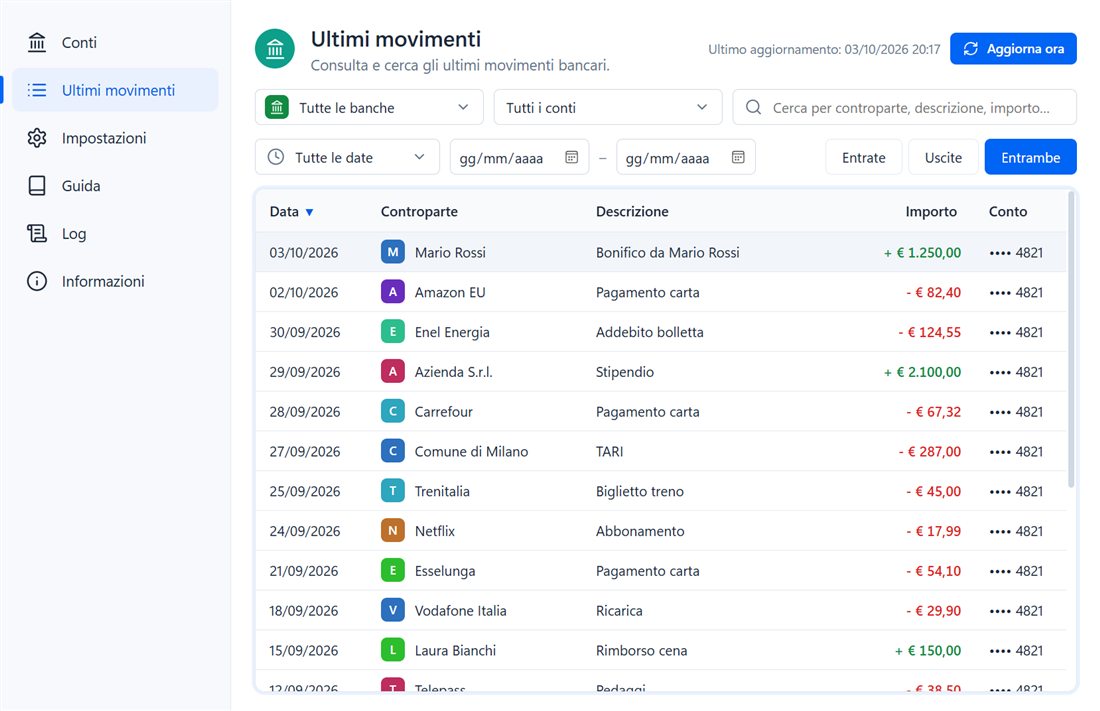
@count - Ultimi movimenti@count - Recent transactions AGAP
@count: elenco degli ultimi movimenti bancari con filtri per banca, conto, periodo, entrate e uscite
Clicca per ingrandireClick to enlarge

💡 Cos'è @countWhat is @count

@count (si legge atcount) è una piccola applicazione per Windows 10 e Windows 11 che resta nell'area di notifica e tiene d'occhio i tuoi conti bancari al posto tuo. Si collega alle banche attraverso le API Open Banking PSD2 di Enable Banking, scarica i movimenti recenti a intervalli regolari e ti mostra una notifica per ogni nuovo movimento: accrediti, addebiti, pagamenti con carta, bonifici, bollette. @count (pronounced atcount) is a small application for Windows 10 and Windows 11 that lives in the notification area and keeps an eye on your bank accounts for you. It connects to banks through Enable Banking's PSD2 Open Banking APIs, downloads recent transactions at regular intervals and shows a notification for every new transaction: credits, debits, card payments, transfers, bills.

Non è un'app di home banking e non sostituisce quella della tua banca: l'accesso è in sola lettura, quindi @count non può disporre pagamenti e non vede mai le tue credenziali, perché l'autenticazione forte (SCA) avviene direttamente sul sito o sull'app della banca. Movimenti, impostazioni e log vengono salvati solo sul tuo computer. It is not a home banking app and does not replace your bank's app: access is read-only, so @count cannot make payments and never sees your credentials, because strong customer authentication (SCA) takes place directly on your bank's website or app. Transactions, settings and logs are stored on your computer only.

Perché @countWhy @count

Sempre informato, senza aprire l'home bankingAlways informed, without opening home banking

Un controllo discreto e automatico dei tuoi conti, pensato per chi vuole sapere subito cosa entra e cosa esce.Discreet, automatic monitoring of your accounts, built for anyone who wants to know right away what comes in and what goes out.

🔔

Notifica a ogni movimentoAn alert for every transaction

Un avviso in basso a destra per ogni nuovo movimento contabilizzato; se ne arrivano più di cinque insieme, un riepilogo per banca.A popup in the bottom-right corner for every new booked transaction; when more than five arrive together, one summary per bank.

🛡️

Sola lettura PSD2Read-only PSD2

Il consenso concesso alla banca permette solo di leggere saldi e movimenti: nessun pagamento, nessuna credenziale bancaria nell'app.The consent you grant your bank only allows reading transactions: no payments, no bank credentials inside the app.

💻

Dati solo sul tuo PCData on your PC only

Conti, movimenti e log restano nel tuo profilo Windows. @count comunica soltanto con Enable Banking, senza server intermedi di AGAP.Accounts, transactions and logs stay in your Windows profile. @count talks to Enable Banking only, with no AGAP servers in between.

⚡

LeggerissimoFeatherweight

Un unico eseguibile di circa 2,7 MB, senza runtime aggiuntivi: parte in un attimo e lavora in silenzio nel tray.A single executable of about 2.7 MB with no extra runtimes: it starts instantly and works quietly in the tray.

Come funzionaHow it works

Tre passaggi e i tuoi conti sono sotto controlloThree steps and your accounts are under control

La configurazione si fa una sola volta; un tutorial integrato ti guida passo per passo.Setup is done once; a built-in tutorial guides you step by step.

1

Configura Enable BankingSet up Enable Banking

Crea la tua applicazione nel pannello di Enable Banking e importa in @count la chiave .pem: l'ID applicazione viene letto dal nome del file. In alternativa @count genera chiave e certificato per te.Create your application in the Enable Banking control panel and import the .pem key into @count: the application ID is read from the file name. Alternatively, @count generates the key and certificate for you.

2

Collega i tuoi contiLink your accounts

Scegli paese e banca e autorizza l'accesso nel tuo browser, dove funzionano accessi, link via e-mail e app di conferma. @count riconosce il codice di ritorno e completa il collegamento da solo.Pick your country and bank and authorize access in your browser, where sign-ins, e-mail links and confirmation apps all work. @count detects the return code and completes the link on its own.

3

Ricevi le notificheGet notified

La prima importazione salva fino a 90 giorni di storico senza notifiche. Da quel momento, a ogni controllo, ricevi un avviso solo per i movimenti davvero nuovi.The first import stores up to 90 days of history without notifications. From then on, every check alerts you only about genuinely new transactions.

Conti personali gratis con Enable Banking.Personal accounts free with Enable Banking. Per un'applicazione Production scegli nel pannello Activate by linking accounts e collega i tuoi conti: l'applicazione diventa attiva in modalità limitata (Restricted Production), sufficiente per l'uso personale. Per provare puoi usare la Sandbox. For a Production application choose Activate by linking accounts in the panel and link your own accounts: the application becomes active in restricted mode (Restricted Production), which is enough for personal use. You can use the Sandbox to try it out.
FunzionalitàFeatures

Tutto quello che serve per seguire i tuoi contiEverything you need to follow your accounts

Gli screenshot usano dati di esempio inventati. Clicca un'immagine per vederla a piena risoluzione.Screenshots use made-up sample data. Click an image to view it at full resolution.

Ultimi movimentiRecent transactions

Cerca, filtra e ordina i movimenti di tutti i contiSearch, filter and sort transactions across all accounts

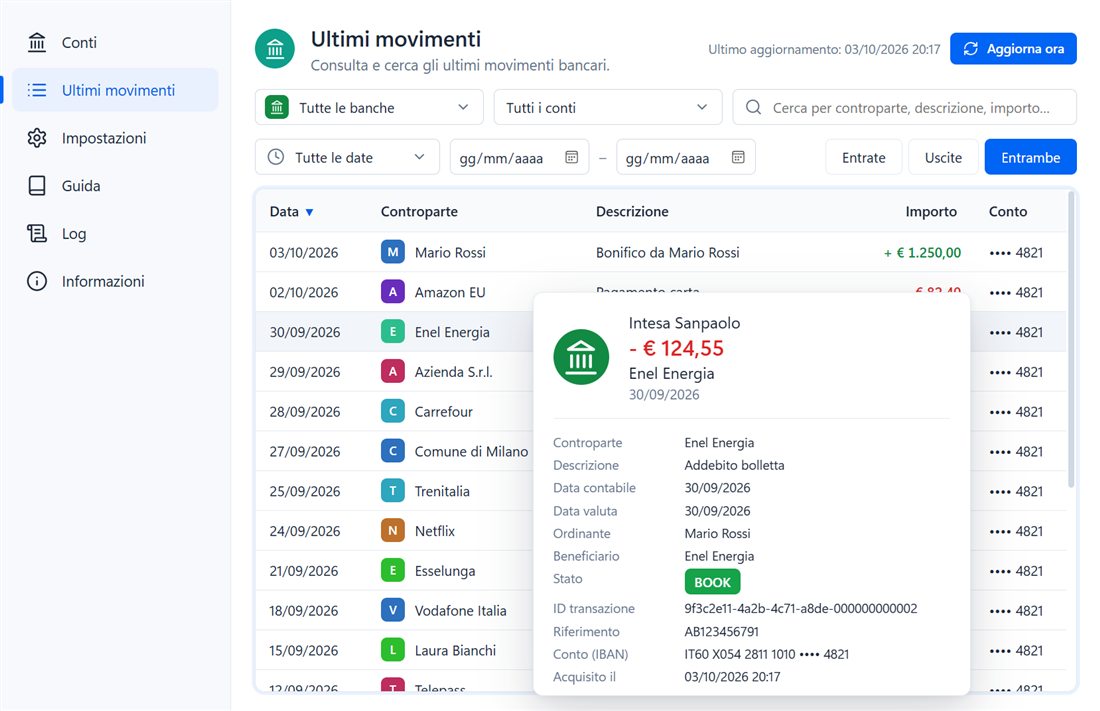
Un unico elenco per tutte le banche collegate, con controparte, descrizione, importo e conto sempre in vista.One list for every linked bank, with counterparty, description, amount and account always in view.

  • ✓ Filtri: banca, conto, entrate/uscite e ricerca per controparte, descrizione o importo.Filters: bank, account, income/expenses and search by counterparty, description or amount.
  • ✓ Periodi: ultimi 7/30/90 giorni, questo mese, mese scorso, quest'anno o date personalizzate.Periods: last 7/30/90 days, this month, last month, this year or custom dates.
  • ✓ Colonne: ordinabili e ridimensionabili, con scelte ricordate alla riapertura.Columns: sortable and resizable, with your choices remembered.
  • ✓ Controparte intelligente: se la banca non la invia, viene ricavata dalla causale (esercente POS, beneficiario, ente pagoPA).Smart counterparty: when the bank doesn't send it, it is extracted from the remittance text (POS merchant, payee, pagoPA entity).
Elenco movimenti di @count con anteprima del dettaglio al passaggio del mouse
Ultimi movimenti • Anteprima al passaggio del mouseRecent transactions • Hover preview 🔍
Dettaglio e report PDFDetails & PDF report

Tutti i dati del movimento e un PDF in un clicEvery transaction detail and a PDF in one click

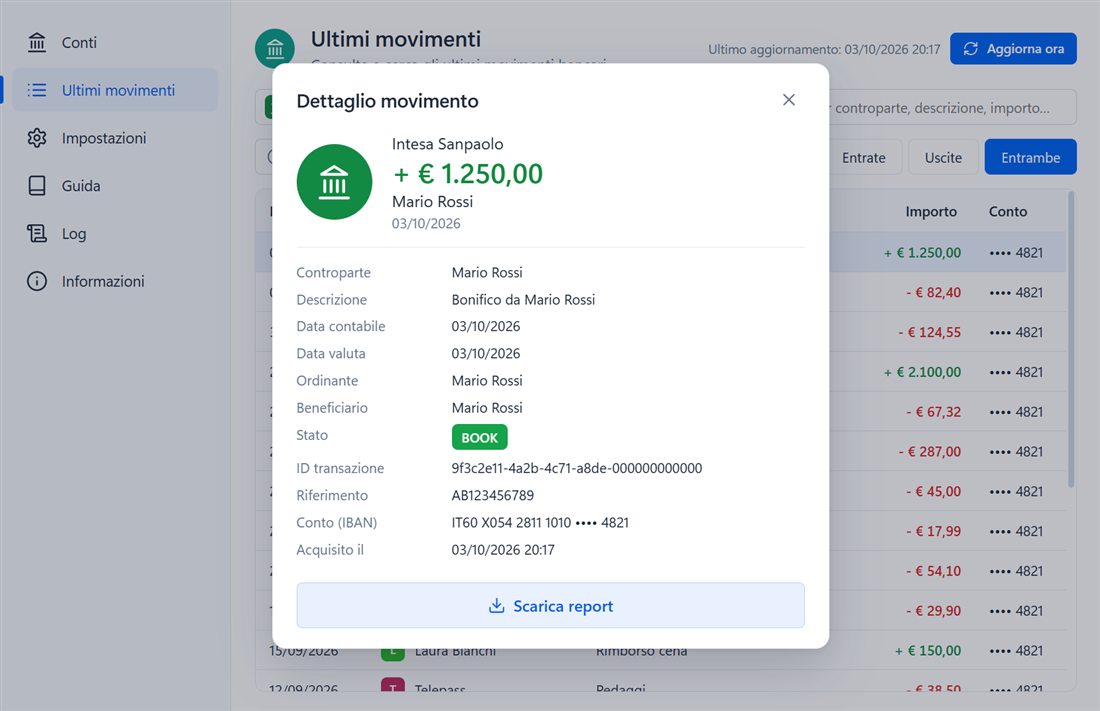
Clicca un movimento (o premi Invio) per aprire il dettaglio completo; Scarica report crea un PDF di una pagina nella cartella dei report e lo apre.Click a transaction (or press Enter) to open its full details; Download report creates a one-page PDF in your reports folder and opens it.

  • ✓ Data contabile e valuta, ordinante, beneficiario, stato, ID transazione e riferimento.Booking and value date, debtor, creditor, status, transaction ID and reference.
  • ✓ Report PDF con banca, IBAN, importo e causale, salvato in Documenti\atcount\Reports.PDF report with bank, IBAN, amount and remittance, saved to Documents\atcount\Reports.
  • ✓ Report anche per un elenco filtrato di movimenti, su più pagine.Reports for a filtered list of transactions too, across multiple pages.
Dettaglio di un movimento bancario in @count con il pulsante Scarica report
Dettaglio movimento • Scarica report PDFTransaction details • Download PDF report 🔍
Conti e autorizzazioniAccounts & authorizations

Stato delle autorizzazioni PSD2 sempre chiaroPSD2 authorization status at a glance

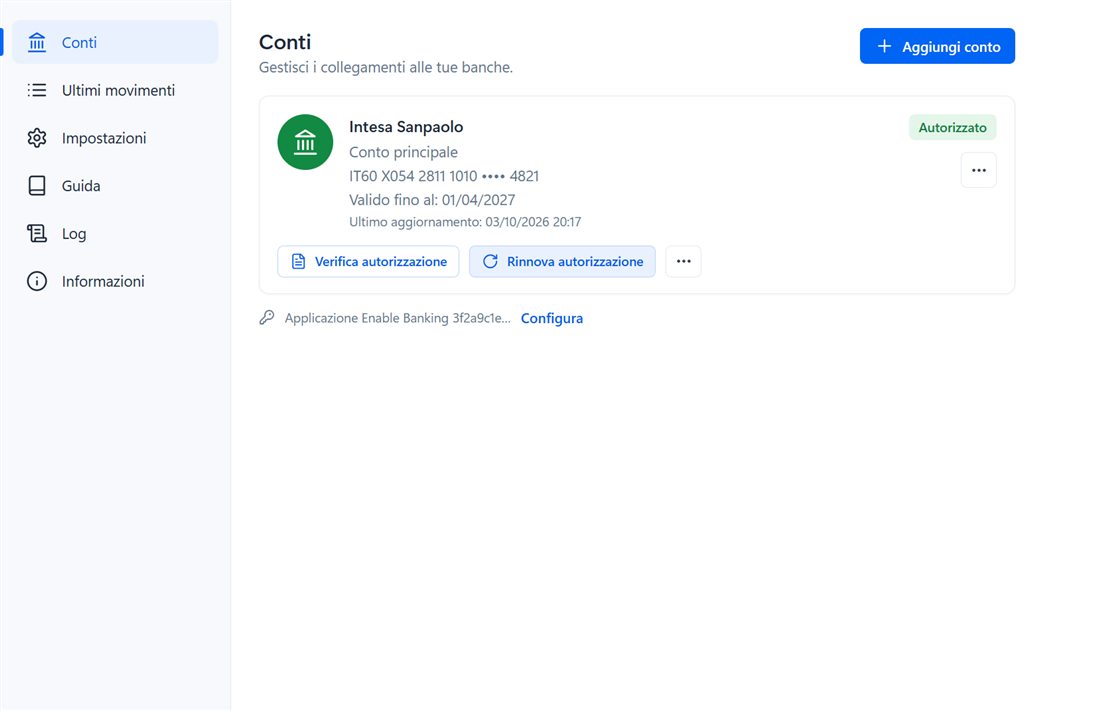
Ogni conto mostra banca, IBAN mascherato, scadenza del consenso e ultimo aggiornamento, con un badge di stato: autorizzato, in scadenza, scaduto, revocato o in errore.Each account shows its bank, masked IBAN, consent expiry and last update, with a status badge: authorized, expiring, expired, revoked or error.

  • ✓ Avviso di scadenza: 14 giorni prima della fine del consenso (massimo 180 giorni, secondo la banca).Expiry warning: 14 days before the consent ends (up to 180 days, depending on the bank).
  • ✓ Rinnovo senza perdite: il conto viene riconosciuto dall'IBAN e storico e impostazioni restano.Lossless renewal: the account is matched by IBAN and history and settings are kept.
  • ✓ Adattamento automatico: se una banca concede meno di 90 giorni di storico, @count si adegua da solo.Automatic adaptation: when a bank allows less than 90 days of history, @count adjusts by itself.
Schermata Conti di @count con stato dell'autorizzazione e rinnovo
Conti • Verifica e rinnovo autorizzazioneAccounts • Check and renew authorization 🔍
Aggiornamento e notificheRefresh & notifications

Controlli automatici che rispettano i limiti delle bancheAutomatic checks that respect bank limits

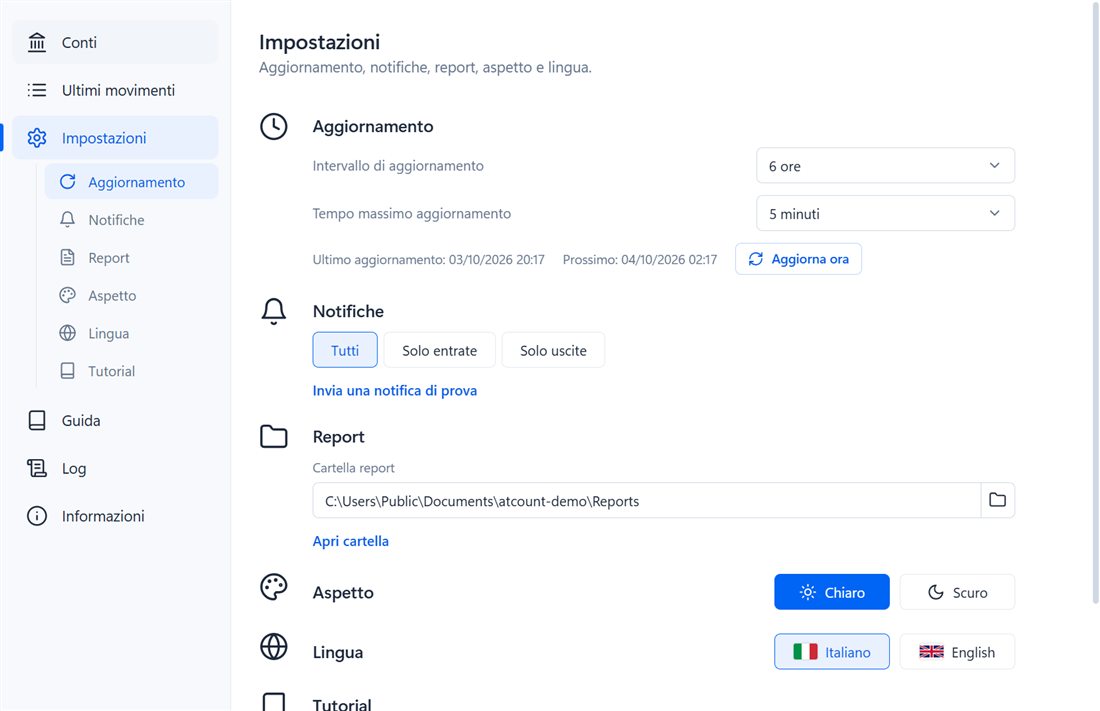
Scegli ogni quanto controllare i conti e quali movimenti notificare. L'intervallo viene rispettato anche dopo sospensione o riavvio del PC.Choose how often to check your accounts and which transactions to notify. The interval is honoured even after sleep or a PC restart.

  • ✓ Intervallo: 6, 8, 12 o 24 ore, più Aggiorna ora quando vuoi.Interval: 6, 8, 12 or 24 hours, plus Refresh now whenever you like.
  • ✓ Notifiche: tutti i movimenti, solo entrate o solo uscite, con notifica di prova.Notifications: all transactions, income only or expenses only, with a test notification.
  • ✓ Tempo massimo: un aggiornamento bloccato da una banca lenta si ferma da solo dopo 1, 2, 5 o 10 minuti.Timeout: a refresh held up by a slow bank stops on its own after 1, 2, 5 or 10 minutes.
  • ✓ Aspetto: tema chiaro o scuro, interfaccia in italiano o inglese.Appearance: light or dark theme, Italian or English interface.
Impostazioni di @count: aggiornamento, notifiche, report, aspetto e lingua
Impostazioni • Intervallo, notifiche, reportSettings • Interval, notifications, reports 🔍
☰

Menu nel trayTray menu

Conti collegati con il loro stato, ora dell'ultimo aggiornamento e comandi rapidi: aggiorna, verifica o rinnova l'autorizzazione, apri movimenti e impostazioni.Linked accounts with their status, last refresh time and quick commands: refresh, check or renew authorization, open transactions and settings.

🔕

Nessun doppioneNo duplicates

I movimenti già noti vengono riconosciuti e ignorati, così non ricevi mai due notifiche per la stessa operazione. I movimenti in attesa vengono notificati quando sono contabilizzati.Known transactions are recognised and skipped, so you never get two alerts for the same operation. Pending transactions are notified once booked.

⌨

TastieraKeyboard

Naviga i movimenti con frecce, PagSu/PagGiù, Home/Fine; Invio apre il dettaglio, Esc chiude qualsiasi finestra.Browse transactions with arrows, PageUp/PageDown, Home/End; Enter opens details, Esc closes any dialog.

🧾

Log consultabileReadable log

Avvii, aggiornamenti, avvisi ed errori con filtri e ricerca. Il log ruota da solo e non contiene chiavi, token o codici: puoi allegarlo a una segnalazione.Starts, refreshes, warnings and errors with filters and search. The log rotates automatically and holds no keys, tokens or codes: you can attach it to a report.

📖

Guida e tutorial integratiBuilt-in guide & tutorial

Una guida illustrata e un tutorial introduttivo su Enable Banking sono sempre disponibili dentro l'app, in italiano e in inglese.An illustrated guide and an introductory Enable Banking tutorial are always available inside the app, in Italian and English.

↻

RobustoRobust

Salvataggi atomici con backup, ripresa automatica dopo sospensione o ibernazione, istanza singola e finestra che ricorda dimensione e posizione.Atomic saves with backups, automatic recovery after sleep or hibernation, single instance and a window that remembers its size and position.

Screenshot

@count in uso@count in action

Notifiche, menu del tray, report PDF e collegamento della banca: un'interfaccia compatta e chiara.Notifications, tray menu, PDF report and bank linking: a compact, clear interface.

Notifica del nuovo movimentoNew transaction notification

Banca, importo, controparte e causale; un clic apre il dettaglio del movimento.Bank, amount, counterparty and description; one click opens the transaction details.

Menu del trayTray menu

Stato dei conti e comandi principali sempre a portata di clic.Account status and main commands always one click away.

Report PDFPDF report

Riepilogo informativo del movimento, pronto da archiviare o condividere.An informative transaction summary, ready to archive or share.

Collegamento della bancaBank linking

Autorizzazione nel browser (consigliata) o direttamente dentro @count.Authorization in the browser (recommended) or directly inside @count.

Configurazione guidataGuided setup

Importa la chiave, verifica l'applicazione e l'URL di reindirizzamento.Import the key, verify the application and the redirect URL.

Log delle attivitàActivity log

Cosa ha fatto @count, dal più recente, con filtri per avvisi ed errori.What @count did, newest first, with warning and error filters.

Sicurezza e privacySecurity & privacy

I tuoi dati bancari restano tuoiYour banking data stays yours

@count è progettato per fare una cosa sola, leggere i movimenti, e per tenere tutto sul tuo computer.@count is designed to do one thing only, read transactions, and to keep everything on your computer.

🔐

Credenziali mai condiviseCredentials never shared

L'accesso alla banca avviene sul sito o sull'app della banca. Il codice di autorizzazione non viene mai salvato né scritto nei log.You sign in on your bank's own website or app. The authorization code is never stored or written to logs.

📁

Archivio localeLocal storage

Impostazioni, conti e movimenti in %LOCALAPPDATA%\AGAP\atcount, cartella non sincronizzata con il profilo roaming.Settings, accounts and transactions in %LOCALAPPDATA%\AGAP\atcount, a folder that does not roam with your profile.

🗝️

Chiave sotto il tuo controlloKey under your control

La chiave privata della tua applicazione Enable Banking resta nel tuo profilo Windows: non viene mai inclusa nel programma, inviata altrove o scritta nei log.Your Enable Banking application's private key stays in your Windows profile: it is never bundled, sent elsewhere or written to logs.

📄

Report informativiInformative reports

I PDF riassumono i dati ricevuti tramite Open Banking: sono utili per archivio e promemoria, ma non sono documenti ufficiali della banca.PDFs summarise the data received through Open Banking: useful for records and reminders, but not official bank documents.

Domande frequentiFrequently asked questions

FAQ su @count@count FAQ

Risposte rapide su funzionamento, sicurezza, banche e requisiti.Quick answers about how it works, security, banks and requirements.

Cos'è @count?What is @count?

@count (atcount) è un'app per Windows che resta nel tray, controlla periodicamente i conti bancari tramite Open Banking PSD2 e mostra una notifica per ogni nuovo movimento, con elenco movimenti consultabile e report PDF.@count (atcount) is a Windows tray app that periodically checks your bank accounts through PSD2 Open Banking and shows a notification for every new transaction, with a searchable transaction list and PDF reports.

@count può disporre pagamenti o vedere le mie credenziali?Can @count make payments or see my credentials?

No. L'accesso è in sola lettura: @count non può disporre pagamenti e non vede mai le credenziali bancarie, perché l'autenticazione avviene direttamente con la banca.No. Access is read-only: @count cannot make payments and never sees your bank credentials, because authentication happens directly with your bank.

Cosa serve per collegare i conti?What do I need to link my accounts?

Una propria applicazione Enable Banking. Per i conti personali è gratuita nella modalità Restricted Production, che si attiva collegando i propri conti. La configurazione si esegue una sola volta, con l'aiuto del tutorial integrato.Your own Enable Banking application. For personal accounts it is free in Restricted Production mode, activated by linking your own accounts. Setup is done once, helped by the built-in tutorial.

Quali banche sono supportate?Which banks are supported?

Le banche raggiungibili tramite Enable Banking: in @count scegli il paese e poi la banca dall'elenco. Alcune banche concedono meno storico di altre (ad esempio Intesa Sanpaolo circa 60 giorni) e @count si adatta automaticamente.The banks reachable through Enable Banking: in @count you pick the country and then the bank from the list. Some banks allow less history than others (Intesa Sanpaolo about 60 days, for instance) and @count adapts automatically.

Dove vengono salvati i dati?Where is my data stored?

Solo sul tuo computer, in %LOCALAPPDATA%\AGAP\atcount: impostazioni, conti, movimenti e log. @count comunica soltanto con Enable Banking.On your computer only, in %LOCALAPPDATA%\AGAP\atcount: settings, accounts, transactions and logs. @count only communicates with Enable Banking.

Ogni quanto vengono controllati i movimenti?How often are transactions checked?

Ogni 6 ore per impostazione predefinita, oppure ogni 8, 12 o 24 ore. Le banche limitano gli accessi automatici (di norma 4 al giorno per conto), quindi è meglio evitare intervalli troppo brevi. Puoi sempre usare Aggiorna ora.Every 6 hours by default, or every 8, 12 or 24 hours. Banks limit automatic access (usually 4 times a day per account), so very short intervals are best avoided. You can always use Refresh now.

Quanto dura l'autorizzazione della banca?How long does the bank authorization last?

Il consenso PSD2 dura al massimo 180 giorni, secondo la banca. @count ti avvisa quando sta per scadere e con Rinnova autorizzazione ricolleghi il conto mantenendo storico e impostazioni.PSD2 consent lasts up to 180 days, depending on the bank. @count warns you before it expires, and Renew authorization relinks the account while keeping history and settings.

Il report PDF ha valore ufficiale?Is the PDF report an official document?

No. È un riepilogo informativo dei dati ricevuti tramite Open Banking, non un documento ufficiale della banca.No. It is an informative summary of the data received through Open Banking, not an official bank document.

Quali sono i requisiti di sistema?What are the system requirements?

Windows 10 o Windows 11 con Microsoft Edge WebView2, già presente in Windows 11. La versione ZIP è un eseguibile unico di circa 2,7 MB che non richiede installazione.Windows 10 or Windows 11 with Microsoft Edge WebView2, already included in Windows 11. The ZIP version is a single executable of about 2.7 MB that needs no installation.

Chiudendo la finestra @count si ferma?Does closing the window stop @count?

No: la X nasconde soltanto la finestra e i controlli continuano. Per uscire davvero usa Esci nel menu del tray. Se l'icona non è visibile, cercala tra le icone nascoste (freccia ^) e trascinala accanto all'orologio.No: the X only hides the window and checks keep running. To really quit, use Exit in the tray menu. If the icon is not visible, look among the hidden icons (the ^ arrow) and drag it next to the clock.

Download

Scarica @count per WindowsDownload @count for Windows

Windows - Microsoft StoreWindows - Microsoft Store

Con Microsoft Store installazione e aggiornamenti automatici sono gestiti direttamente da Windows. With Microsoft Store, installation and automatic updates are handled directly by Windows.

Apri @count nel Microsoft StoreOpen @count in Microsoft Store PrestoSoon

Windows - ZIP portabileWindows - Portable ZIP

Scarica dal sito AGAP l'archivio ZIP con l'eseguibile portabile: estrai atcount.exe in una cartella e avvialo, senza installazione. Gli aggiornamenti della versione ZIP vanno scaricati manualmente da questa pagina. Download the ZIP archive with the portable executable from the AGAP website: extract atcount.exe to a folder and run it, no installation required. Updates for the ZIP version must be downloaded manually from this page.

Scarica @count per Windows (ZIP)Download @count for Windows (ZIP)
  • Windows 10 / 11 con Microsoft Edge WebView2Windows 10 / 11 with Microsoft Edge WebView2
  • Un'applicazione Enable Banking (gratuita per i conti personali)An Enable Banking application (free for personal accounts)
  • Interfaccia in italiano e ingleseItalian and English interface