Matahari • NNTP • Windows • Android

Usenet come una volta, con la sicurezza di oggi Usenet the way it used to be, with today's security

Matahari è un newsreader NNTP per Windows nello stile dei classici lettori offline a 32 bit: newsgroup, elenco dei messaggi e testo in tre riquadri, la barra spaziatrice per andare avanti e i tasti di sempre. Sotto c'è un client moderno: connessioni TLS e STARTTLS con la password mai in chiaro, regole e killfile, ricerca nei testi scaricati e un vero supporto ai file binari yEnc, con coda di download che riprende da dove si era fermata, NZB e PAR2. E sul telefono c'è Matahari per Android, più semplice, per seguire i gruppi e rispondere anche fuori casa. Matahari is an NNTP newsreader for Windows in the style of the classic 32-bit offline readers: newsgroups, message list and text in three panes, the space bar to move on and the keys you already know. Underneath is a modern client: TLS and STARTTLS connections that never send your password in clear, rules and killfile, search in downloaded text and real support for yEnc binaries, with a download queue that resumes where it stopped, NZB and PAR2. And on your phone there is Matahari for Android, simpler, to follow your groups and reply on the go.

✓ Windows e AndroidWindows and Android ✓ TLS e STARTTLSTLS and STARTTLS ✓ Gratuita per uso personaleFree for personal use
Matahari AGAP
Matahari - newsreader Usenet NNTP per Windows e Android
Perché MatahariWhy Matahari

Il lettore di news che conoscevi, senza i suoi limitiThe newsreader you knew, without its limits

I vecchi programmi non parlano più con i server cifrati e non sanno cosa sia yEnc; i client moderni sono pensati solo per scaricare. Matahari tiene insieme le due cose: la lettura delle discussioni e i file, nello stesso riquadro del messaggio.The old programs no longer talk to encrypted servers and don't know what yEnc is; modern clients are built only for downloading. Matahari brings the two together: reading discussions and files, in the same message pane.

📰

Lettura come una voltaOld-school reading

Tre riquadri e tre disposizioni, discussioni chiuse con il contatore [+N], citazioni colorate per livello, intestazioni scaricate prima e corpi su richiesta: si contrassegna, si scarica e si legge anche offline.Three panes and three layouts, collapsed threads with a [+N] counter, quotes coloured by level, headers first and bodies on demand: mark, retrieve and read offline too.

🔐

Sicuro per impostazioneSecure by default

TLS sulla porta 563 o STARTTLS, certificati verificati da Windows, password cifrata con DPAPI e mai inviata in chiaro se non lo consenti tu. I file ricevuti hanno nomi ripuliti e programmi e script non vengono mai aperti.TLS on port 563 or STARTTLS, certificates checked by Windows, password encrypted with DPAPI and never sent in clear unless you allow it. Received files get sanitized names and programs and scripts are never opened.

🪶

Leggero e localeLight and local

Un solo eseguibile di circa 650 KB, nessuna libreria esterna, nessun account e nessun cloud. Archivio robusto con scritture atomiche e riparazione automatica, backup verificati e modalità portatile.A single executable of about 650 KB, no external libraries, no account and no cloud. A robust archive with atomic writes and automatic repair, verified backups and a portable mode.

FunzionalitàFeatures

Dalle intestazioni al file ricompostoFrom the headers to the reassembled file

🗂️

Tre riquadriThree panes

Newsgroup, elenco e testo con tre disposizioni (Ctrl+1..3) e ingrandimento del riquadro con Z. Discussioni per References, ordinamento per colonna, filtri: non letti, seguiti, scaricati, conservati, ignorati. E i tasti di sempre: Spazio, N, T, W segui, I ignora, K conserva, elenco completo sotto F1.Newsgroups, list and text with three layouts (Ctrl+1..3) and pane zoom with Z. Threads by References, sorting by column, filters: unread, watched, retrieved, kept, ignored. And the keys you know: Space, N, T, W watch, I ignore, K keep, full list under F1.

📱

Anche su AndroidOn Android too

Matahari per Android è la versione semplificata per il telefono, solo testo: server TLS e STARTTLS, elenco e ricerca dei newsgroup, discussioni lette a conversazione con citazioni colorate, risposte con citazione e lo stesso invio sicuro del desktop. Tema chiaro o scuro, italiano e inglese.Matahari for Android is the simplified, text-only version for your phone: TLS and STARTTLS servers, newsgroup list and search, threads read as conversations with coloured quotes, replies with quoting and the same safe posting as the desktop. Light or dark theme, English and Italian.

🔐

TLS e STARTTLSTLS and STARTTLS

Più server con login, CAPABILITIES a ogni connessione, certificato non attendibile accettabile per un server con l'impronta mostrata. Prova connessione mostra cifratura, certificato, funzioni del server e l'intero dialogo.Several servers with login, CAPABILITIES on every connection, an untrusted certificate can be accepted for one server with its fingerprint shown. Test Connection shows encryption, certificate, server capabilities and the whole dialogue.

🛡️

Regole, killfile, punteggiRules, killfile, scores

Condizioni su autore, indirizzo, oggetto, gruppo, età, righe, dimensione, testo, Message-ID e riferimenti, anche con espressioni regolari. Azioni: ignora, segna letto, segui, conserva, contrassegna, evidenzia, aggiungi punti. Gruppi con it.*, !it.test e regola rapida da un messaggio.Conditions on author, address, subject, group, age, lines, size, text, Message-ID and references, regular expressions included. Actions: ignore, mark read, watch, keep, mark for retrieval, highlight, add score. Groups with it.*, !it.test and a quick rule from a message.

🔎

Ricerca nell'archivioArchive search

Con Ctrl+Maiusc+F cerchi in oggetto, autore e testo dei messaggi scaricati, in un gruppo o in tutti, per intervallo di date e con espressioni regolari; il risultato si apre con un clic.With Ctrl+Shift+F you search subjects, authors and the text of downloaded messages, in one group or all, by date range and with regular expressions; a result opens with one click.

📦

File binariBinaries

Allegati MIME, uuencode e yEnc nella barra Allegati del messaggio. I file divisi in più articoli sono riconosciuti dall'oggetto ("file.rar" yEnc (3/45)) con parti mancanti e duplicati segnalati; CRC yEnc controllato per ogni parte e per il file.MIME, uuencode and yEnc attachments in the message's Attachments bar. Files split over several articles are recognized from the subject ("file.rar" yEnc (3/45)) with missing parts and duplicates reported; yEnc CRC checked for every part and the whole file.

⬇️

Download, NZB e PAR2Downloads, NZB and PAR2

Coda persistente (Ctrl+J) con pausa, ripresa, riprova, avanzamento e velocità, più connessioni per server. Un download interrotto riparte da dove era; il file appare solo a ricomposizione riuscita. Import ed export NZB, verifica PAR2 integrata, estrazione .zip su richiesta.Persistent queue (Ctrl+J) with pause, resume, retry, progress and speed, several connections per server. An interrupted download resumes where it stopped; the file appears only once reassembled. NZB import and export, built-in PAR2 verification, .zip extraction on request.

✍️

Scrittura e pubblicazioneWriting and posting

Risposte con citazione (anche solo della selezione), Followup-To, identità multiple per server e per gruppo, firma, correttore ortografico di Windows, file allegati in yEnc. Ogni invio passa dalla posta in uscita: se la connessione cade, Matahari verifica con STAT e non ripubblica mai alla cieca.Replies with quoting (of the selection only, too), Followup-To, multiple identities per server and group, signature, Windows spell checker, attached files posted as yEnc. Every post goes through the outbox: if the connection drops, Matahari checks with STAT and never reposts blindly.

⚙️

Su misuraYour way

Italiano e inglese, tema chiaro 3D classico o scuro, icone pixel-art, interfaccia scalabile dall'80% al 300%, configurazione guidata al primo avvio, backup e ripristino verificati, esportazione delle impostazioni senza password, messaggi in .eml.English and Italian, classic 3D light or dark theme, pixel-art icons, UI scalable from 80% to 300%, setup wizard on first start, verified backup and restore, settings export without passwords, messages as .eml.
Screenshot

Matahari in usoMatahari in action

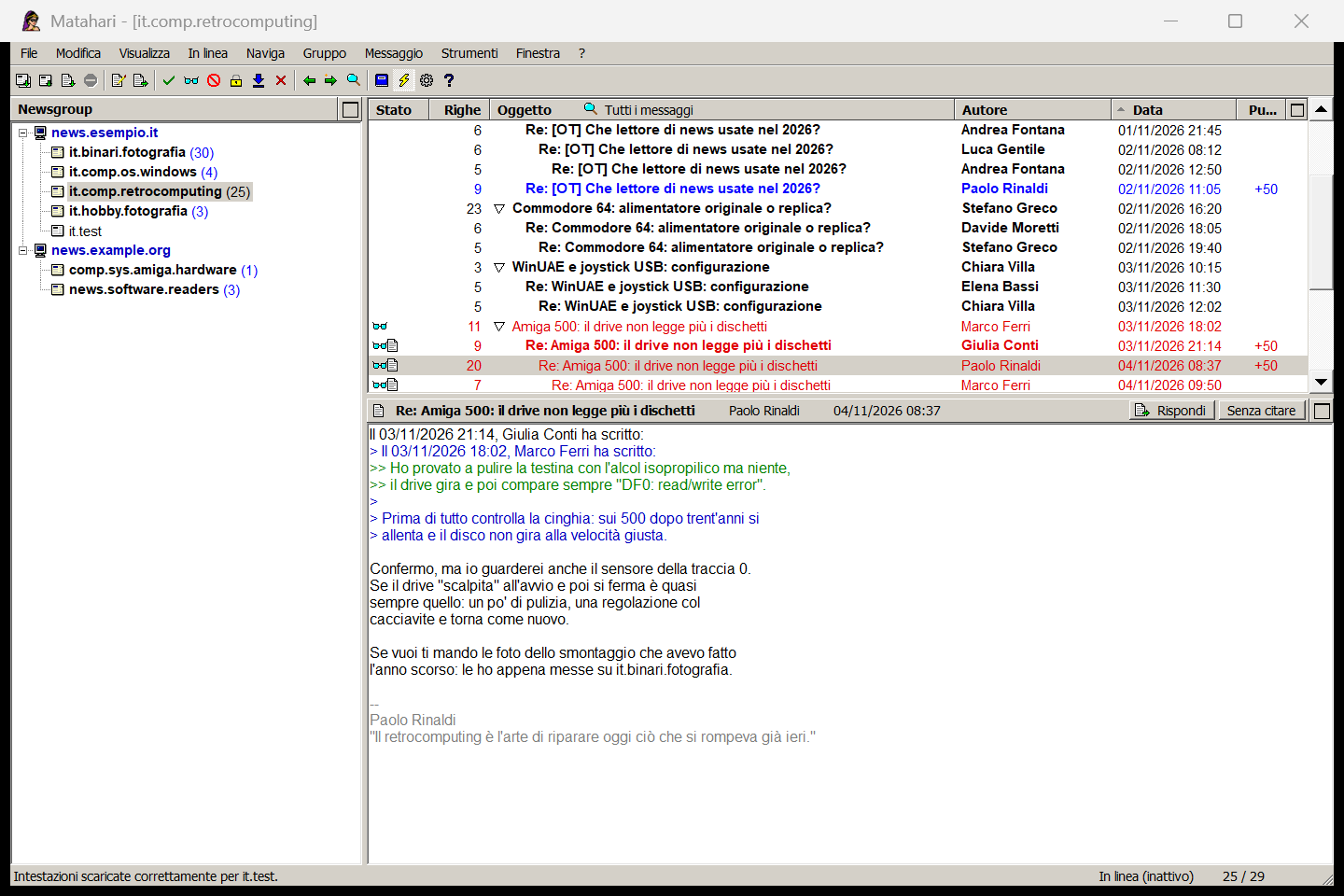
Matahari - lettura di una discussione a tre riquadri con citazioni colorate

Lettura a tre riquadriThree-pane reading

Due server, discussioni per References, citazioni colorate per livello e firma in grigio. La discussione è seguita da una regola e gli autori esperti ricevono punti.Two servers, threads by References, quotes coloured by level and the signature in grey. The thread is watched by a rule and expert authors get a score.

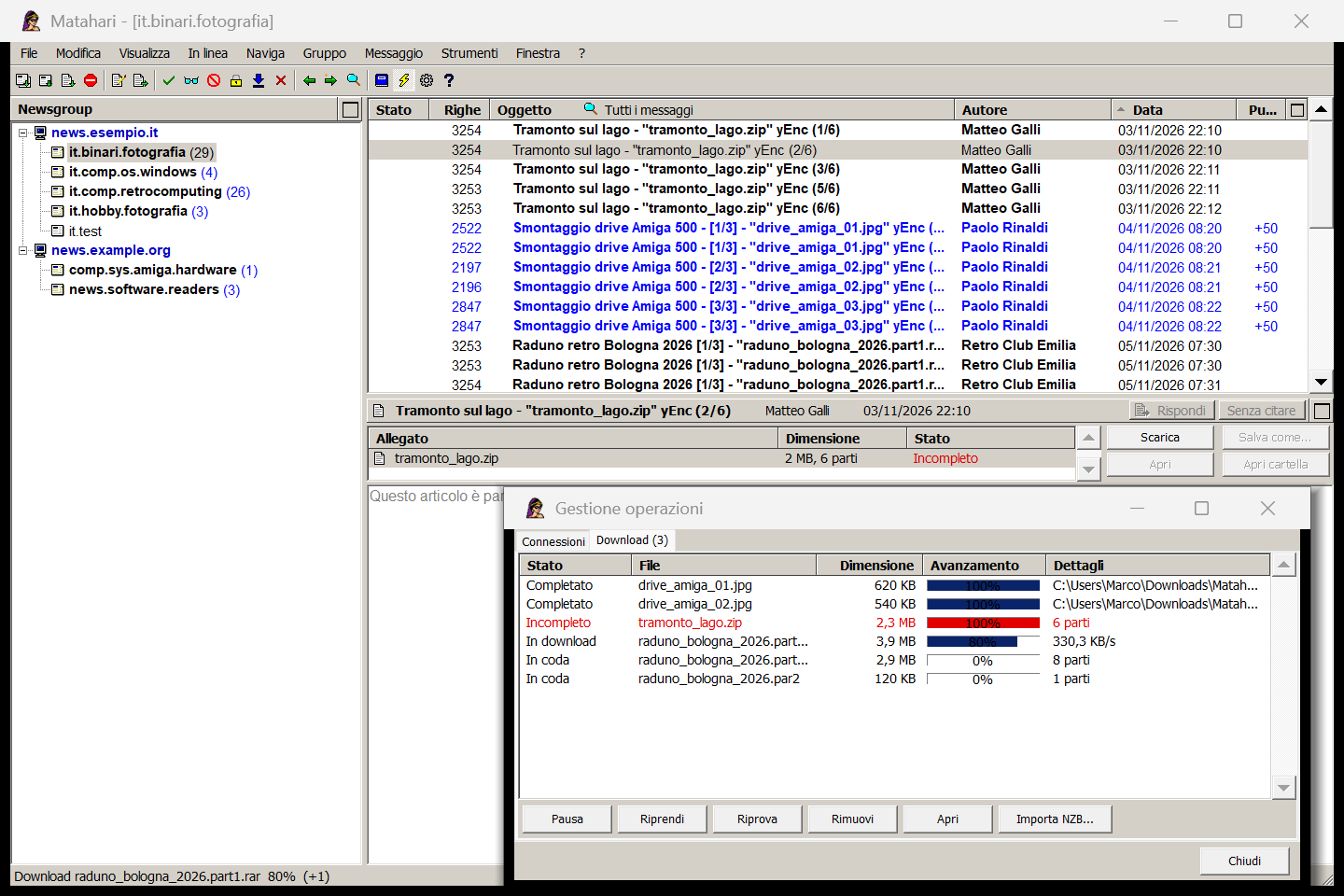
Matahari - parti yEnc, barra Allegati e coda di download

File binari e downloadBinaries and downloads

Parti yEnc riconosciute dall'oggetto, un file con una parte mancante segnalato come incompleto e la coda di download: file completati, uno in corso, altri in coda.yEnc parts recognized from the subject, a file with a missing part flagged as incomplete and the download queue: completed files, one in progress, others queued.

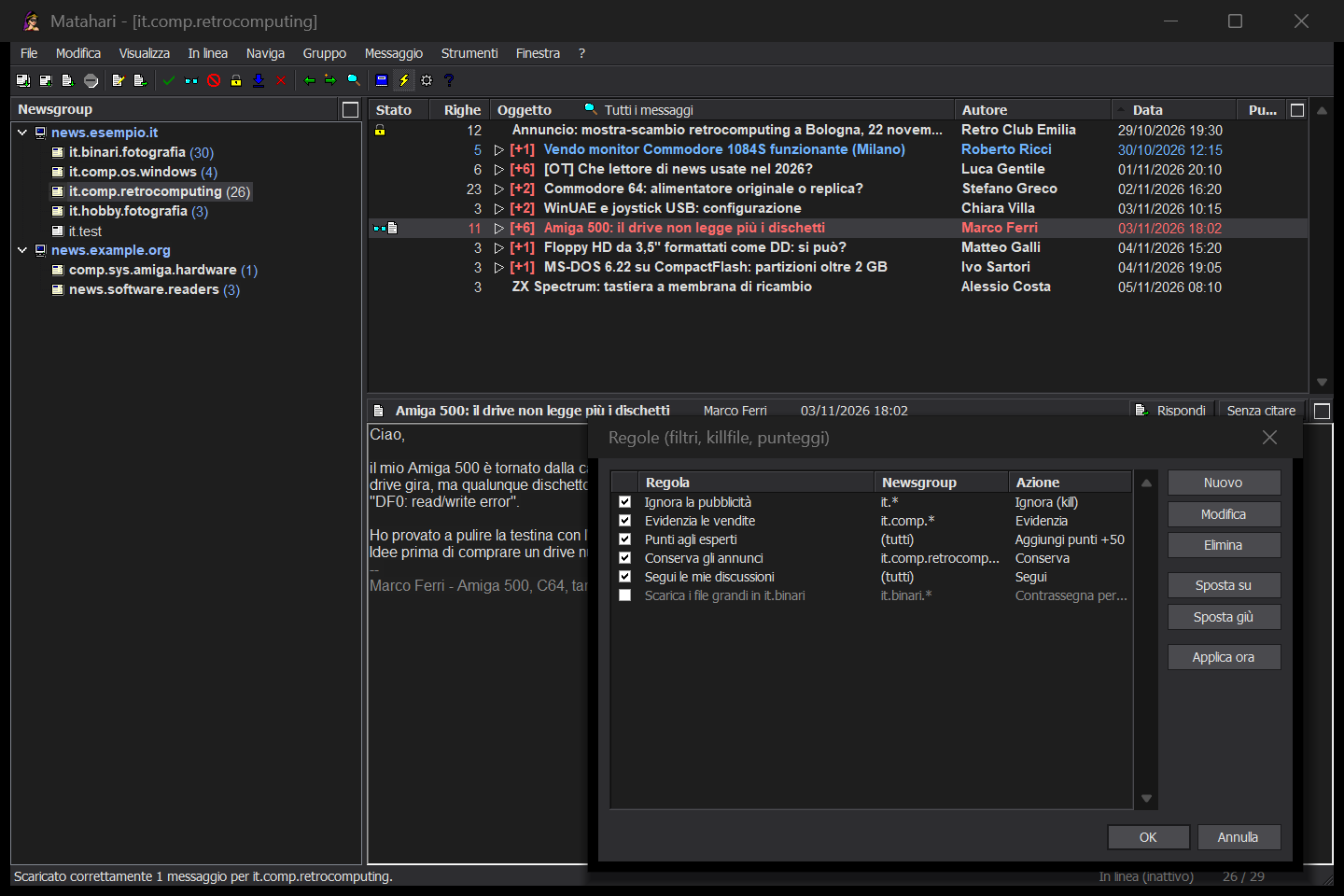
Matahari - regole, killfile e punteggi con tema scuro

Regole e tema scuroRules and dark theme

Discussioni chiuse con il contatore [+N] e le regole: la pubblicità ignorata, le vendite evidenziate, punti agli esperti, annunci conservati e le proprie discussioni seguite.Collapsed threads with the [+N] counter and the rules: ads ignored, sales highlighted, experts scored, announcements kept and your own threads watched.

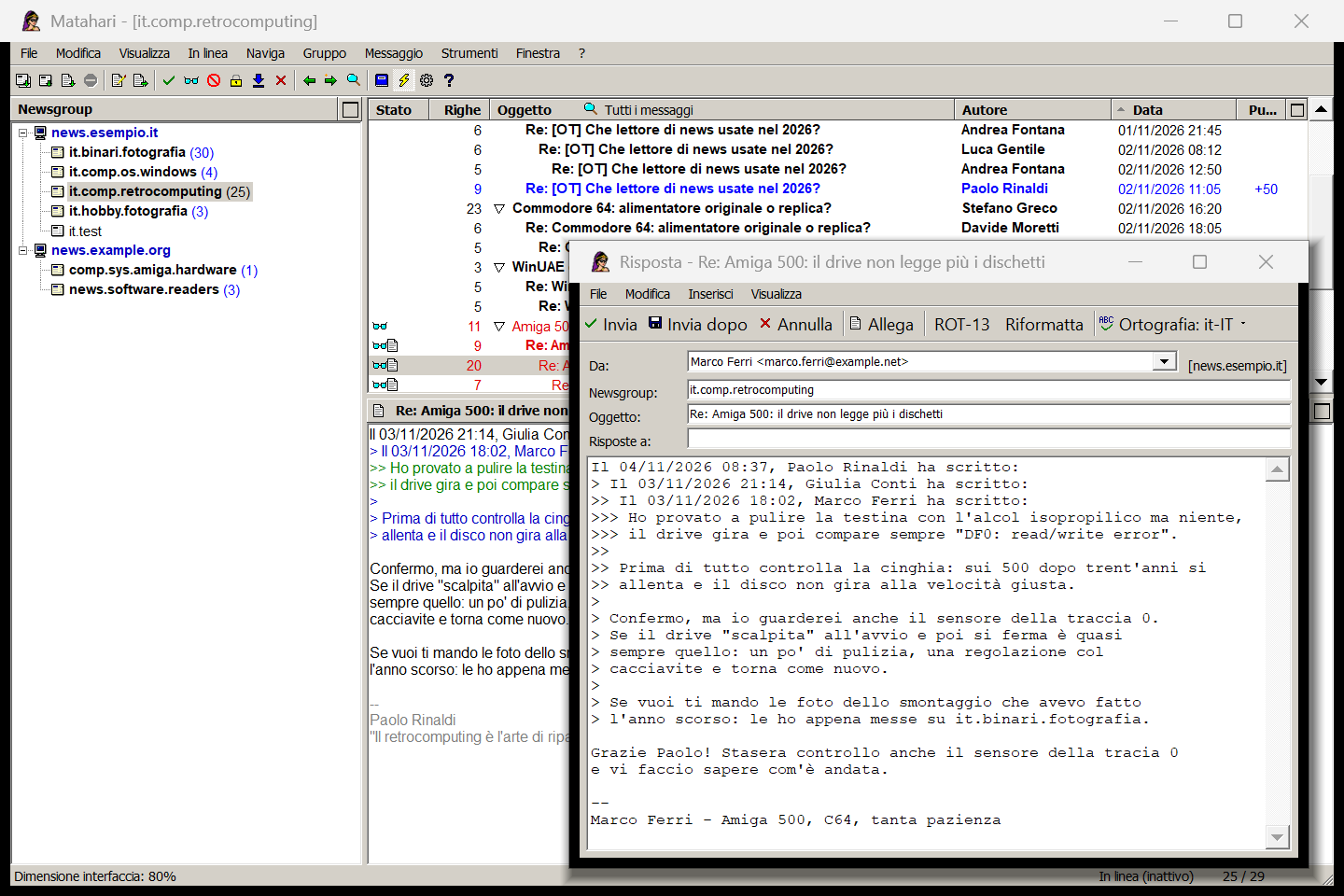
Matahari - risposta sul gruppo con citazione, identità e firma

Risposta sul gruppoFollow-up

Citazione a livelli, scelta dell'identità, firma automatica, correttore ortografico in italiano e Invia dopo per mettere il messaggio nella posta in uscita.Multi-level quoting, identity choice, automatic signature, Italian spell checking and Send later to put the message in the outbox.

Download

Scarica MatahariDownload Matahari

Windows - Setup o versione portatileWindows - Setup or portable

L'archivio ZIP contiene il setup Matahari-1.3.0-setup.exe, che installa per il solo utente senza diritti di amministratore, e l'eseguibile Matahari.exe da usare senza installazione. Richiede Windows 10 o 11 (.NET Framework 4.8, già incluso). I dati vanno in %APPDATA%\Matahari; per la modalità portatile crea un file vuoto portable accanto all'exe e tutto resterà in quella cartella. Interfaccia in italiano e in inglese. The ZIP archive contains the Matahari-1.3.0-setup.exe setup, which installs for the current user without administrator rights, and the Matahari.exe executable to run without installing. Requires Windows 10 or 11 (.NET Framework 4.8, already included). Data goes to %APPDATA%\Matahari; for portable mode create an empty file named portable next to the exe and everything stays in that folder. English and Italian user interface.

Scarica Matahari per WindowsDownload Matahari for Windows

Android - APK

Pacchetto Android APK, scaricabile direttamente dal sito AGAP; richiede Android 8.0 o successivo. È una versione semplificata pensata per leggere e scrivere dal telefono: solo testo, senza allegati né file binari, con i messaggi già letti consultabili anche offline. La password del server è cifrata con l'Android Keystore. Android APK package, downloadable directly from the AGAP website; requires Android 8.0 or later. It is a simplified version made for reading and posting from your phone: text only, no attachments or binaries, with messages already read available offline too. The server password is encrypted with the Android Keystore.

Matahari per AndroidMatahari for Android

Cosa serveWhat you need

Un account presso un server di news (del tuo provider, gratuito o a pagamento). Matahari legge e pubblica solo via NNTP: niente email, nessun motore di ricerca NZB integrato e nessun download che non hai chiesto. La riparazione PAR2 usa un programma esterno compatibile con par2cmdline, se vuoi; la verifica è integrata. An account on a news server (from your provider, free or paid). Matahari reads and posts over NNTP only: no email, no built-in NZB search engine and no downloads you didn't ask for. PAR2 repair uses an external par2cmdline-compatible program if you want it; verification is built in.