REDIR • Quick launcher • Solo WindowsREDIR • Quick launcher • Windows only

File, cartelle e programmi, a un tasto di distanza Files, folders and programs, one keystroke away

REDIR vive nella tray di Windows e aspetta la tua scorciatoia: premi WIN+SPAZIO e compare una barra di ricerca sul monitor in cui stai lavorando. Scrivi qualche lettera, anche più parole in qualsiasi ordine, e apri con Invio file, cartelle e programmi. Le cartelle in cui cercare le scegli tu; di serie c'è anche il menu Start, così REDIR funziona pure come launcher di app. REDIR lives in the Windows tray and waits for your hotkey: press WIN+SPACE and a search bar appears on the monitor you are working on. Type a few letters, even several words in any order, and press Enter to open files, folders and programs. You choose the folders to search; the Start menu is included by default, so REDIR also works as an app launcher.

✓ Solo per WindowsWindows only ✓ Scorciatoia WIN+SPAZIO configurabileConfigurable WIN+SPACE hotkey ✓ Gratuita per uso personaleFree for personal use
REDIR AGAP
REDIR - launcher rapido per Windows
Quick launcher

Smetti di cercare, inizia ad aprireStop searching, start opening

Una barra di ricerca sempre pronta per i file, le cartelle e le app che usi ogni giorno.A search bar always ready for the files, folders and apps you use every day.

⌨️

Scorciatoia globaleGlobal hotkey

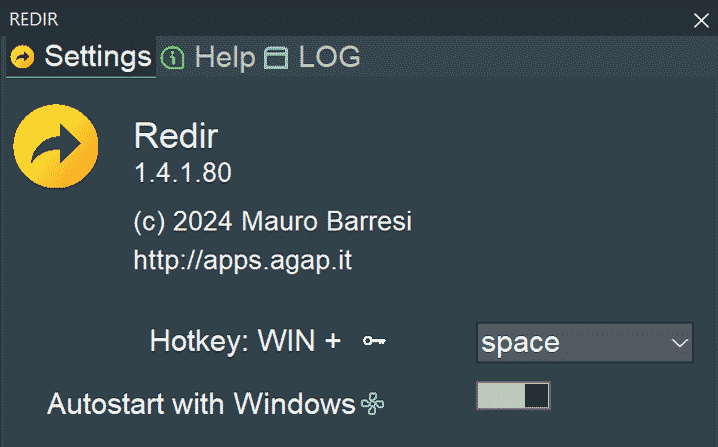
Premi WIN+SPAZIO da qualsiasi programma: la barra compare sul monitor sotto il mouse. Se preferisci, nelle impostazioni scegli un altro tasto da abbinare a WIN.Press WIN+SPACE from any program: the bar appears on the monitor under the mouse. If you prefer, pick another key to pair with WIN in the settings.

🔎

Ricerca a più paroleMulti-word search

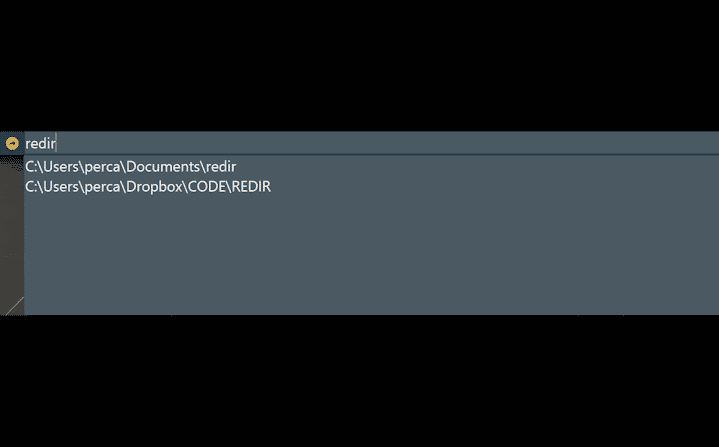
Ogni parola digitata deve comparire nel nome o nel percorso, in qualsiasi ordine: «inv 2026» trova «Invoices 2026». Le lettere trovate sono evidenziate e i risultati migliori vengono prima.Every word you type must appear in the name or path, in any order: "inv 2026" finds "Invoices 2026". Matching letters are highlighted and the best results come first.

📂

Naviga e apriBrowse and open

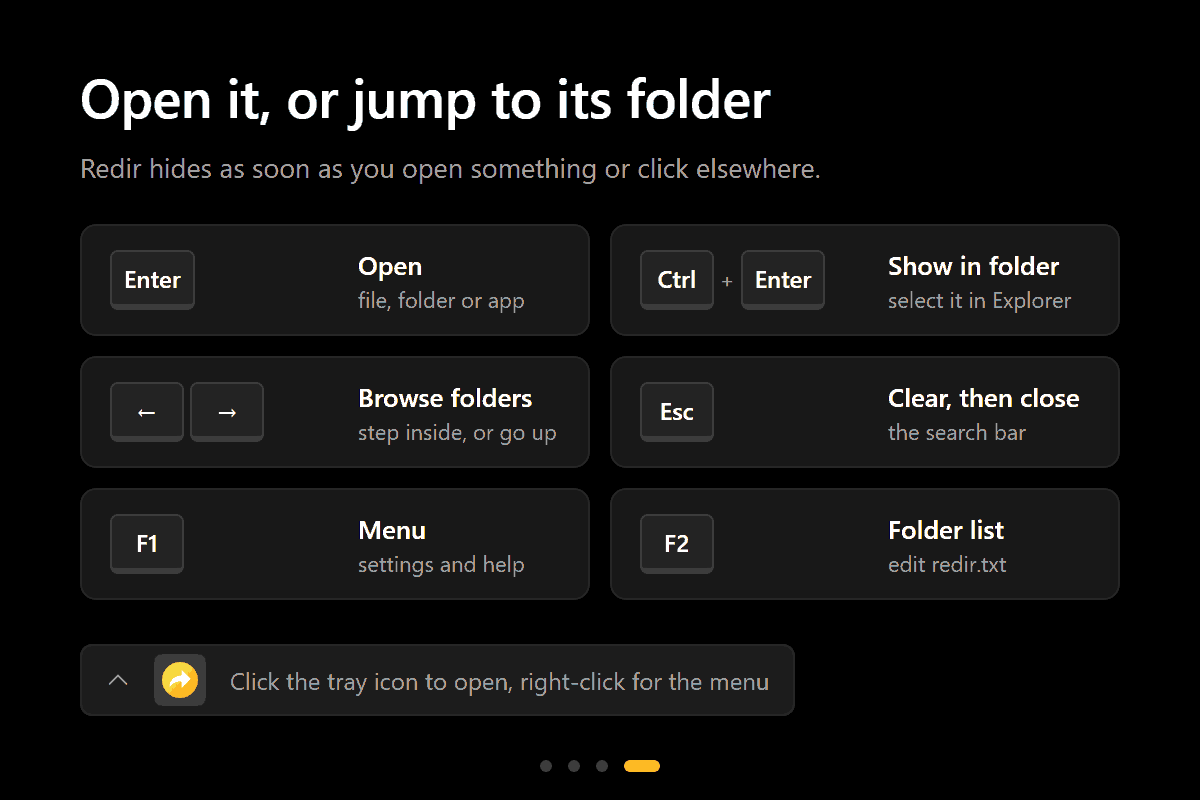
Invio apre il file o la cartella, → entra nella cartella e ← risale, Ctrl+Invio mostra l'elemento in Esplora file. Puoi anche incollare un percorso e aprirlo direttamente.Enter opens the file or folder, → enters the folder and ← goes back up, Ctrl+Enter shows the item in File Explorer. You can also paste a path and open it directly.

FunzionalitàFeatures

Semplice da configurare, immediato da usareSimple to configure, instant to use

📝

Cartelle a sceltaFolders of your choice

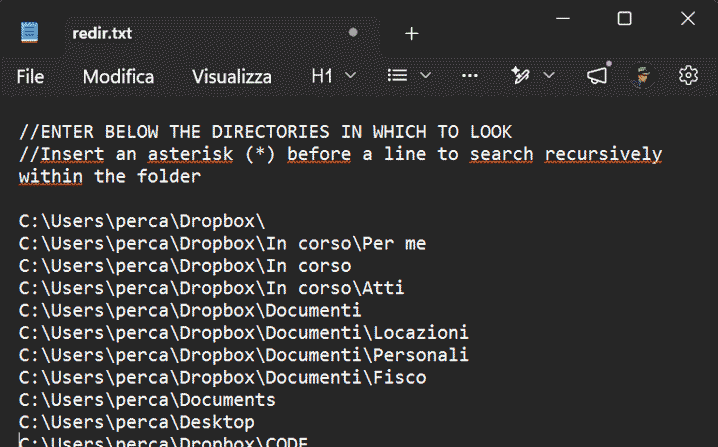
Le cartelle in cui cercare sono elencate in redir.txt (F2 per modificarlo) oppure si aggiungono dal menu con «Add a folder…». Il prefisso * include anche le sottocartelle di primo livello; // commenta una riga.The folders to search are listed in redir.txt (F2 to edit it) or added from the menu with "Add a folder…". The * prefix also includes first-level subfolders; // comments out a line.

🚀

Anche launcher di appAn app launcher too

L'elenco predefinito include i programmi del menu Start e la cartella Documenti: scrivi «word» o «calc» e avvii subito l'app, con la sua icona.The default list includes the Start menu programs and the Documents folder: type "word" or "calc" and launch the app at once, with its own icon.

📋

Apri un percorsoOpen a path

Se non ci sono risultati ma hai digitato o incollato un percorso esistente, REDIR lo apre direttamente: le virgolette di «Copia come percorso» e le variabili come %APPDATA% sono gestite.If there are no results but you typed or pasted an existing path, REDIR opens it directly: quotes from "Copy as path" and variables such as %APPDATA% are handled.

⚙️

ImpostazioniSettings

Scegli il tasto della scorciatoia, attiva l'avvio con Windows, modifica l'elenco delle cartelle e controlla gli aggiornamenti; schede Aiuto e Log incluse.Choose the hotkey, turn on start with Windows, edit the folder list and check for updates; Help and Log tabs included.

📥

Sempre pronto nella trayAlways ready in the tray

Una sola copia resta nell'area di notifica senza occupare la barra delle applicazioni; un avviso ti informa quando è disponibile una nuova versione.A single copy stays in the notification area without taking space on the taskbar; a notification tells you when a new version is available.

🎓

Tutorial e guidaTutorial and guide

Al primo avvio un tutorial in 4 passaggi; la guida utente in PDF è sempre disponibile dal menu (F1). Tema scuro con angoli arrotondati di Windows 11 e supporto multi-monitor e DPI.A 4-step tutorial on first start; the PDF user guide is always available from the menu (F1). Dark theme with Windows 11 rounded corners and multi-monitor and DPI support.

Screenshot

REDIR in usoREDIR in action

REDIR - premi WIN+SPAZIO

1. Premi WIN+SPAZIO1. Press WIN+SPACE

Da qualsiasi programma la barra di ricerca compare sul monitor in cui stai lavorando; premi di nuovo la scorciatoia o Esc per chiuderla.From any program the search bar appears on the monitor you are working on; press the hotkey again or Esc to close it.

REDIR - scrivi qualche lettera

2. Scrivi qualche lettera2. Type a few letters

Una o più parole, in qualsiasi ordine: ognuna deve comparire nel nome o nel percorso. I risultati mostrano icona, nome evidenziato e cartella.One or more words, in any order: each must appear in the name or path. Results show icon, highlighted name and folder.

REDIR - scegli dove cercare

3. Scegli dove cercare3. Choose where to search

Le cartelle sono elencate in redir.txt, una per riga: aggiungile dal menu o con F2, con * per includere le sottocartelle.Folders are listed in redir.txt, one per line: add them from the menu or with F2, with * to include subfolders.

REDIR - apri o vai alla cartella

4. Apri o vai alla cartella4. Open it, or jump to its folder

Invio apre l'elemento, Ctrl+Invio lo mostra in Esplora file, le frecce ti fanno entrare e uscire dalle cartelle senza lasciare la tastiera.Enter opens the item, Ctrl+Enter shows it in File Explorer, arrow keys take you in and out of folders without leaving the keyboard.

Download

Scegli la versione di REDIRChoose your REDIR version

Windows - Microsoft Store

Il canale consigliato per Windows è Microsoft Store: installazione e aggiornamenti automatici sono gestiti direttamente dallo Store. The recommended channel for Windows is Microsoft Store: installation and automatic updates are handled directly by the Store.

Apri REDIR nel Microsoft StoreOpen REDIR in Microsoft Store PrestoSoon

Windows - ZIP portabileWindows - Portable ZIP

Versione portatile: estrai l'archivio in una cartella e avvia l'eseguibile, senza installazione. REDIR controlla gli aggiornamenti all'avvio e ti avvisa con una notifica quando c'è una nuova versione da scaricare da questa pagina. Interfaccia in inglese. Portable version: extract the archive to a folder and run the executable, no installation required. REDIR checks for updates at startup and notifies you when a new version is available to download from this page. English user interface.

Scarica REDIR per WindowsDownload REDIR for Windows