JS Obfuscator 1.3 • Terser + javascript-obfuscator • Windows

Il tuo JavaScript, compresso e offuscato senza lasciare il PC Your JavaScript, minified and obfuscated without leaving your PC

JS Obfuscator riunisce in un'unica app desktop Terser per la compressione e javascript-obfuscator per l'offuscamento. Apri o incolla un file .js, .mjs o .cjs, scegli un preset e premi Offusca: in un attimo hai il risultato con dimensioni, rapporto di crescita e tempo di elaborazione. Con il batch elabori intere cartelle mantenendo la struttura. Il codice non viene mai inviato online e non serve una connessione Internet. JS Obfuscator brings together in a single desktop app Terser for minification and javascript-obfuscator for obfuscation. Open or paste a .js, .mjs or .cjs file, pick a preset and press Obfuscate: you get the result right away with size, growth ratio and processing time. With the batch you process whole folders keeping their structure. Your code is never sent online and no Internet connection is needed.

✓ File singoli e cartelleSingle files and folders ✓ 100% locale, nessun upload100% local, no uploads ✓ Gratuita per uso personaleFree for personal use
JS Obfuscator AGAP
JS Obfuscator - compressore e offuscatore JavaScript per Windows
Perché JS ObfuscatorWhy JS Obfuscator

Il codice da proteggere non va incollato in un sito webCode worth protecting shouldn't be pasted into a website

Gli offuscatori online chiedono di caricare proprio il codice che vuoi tenere riservato. JS Obfuscator fa lo stesso lavoro sul tuo computer, con motori open source a versione fissa e risultati riproducibili.Online obfuscators ask you to upload the very code you want to keep private. JS Obfuscator does the same job on your computer, with pinned open-source engines and reproducible results.

🛡️

Protezione su misuraProtection to measure

Tre preset pronti, dal più leggero al più robusto, e oltre 40 opzioni avanzate quando serve controllo totale. Lo stesso seed con le stesse opzioni produce lo stesso output.Three ready-made presets, from lightest to most robust, and 40+ advanced options when you need full control. The same seed with the same options produces the same output.

📦

Prima comprime, poi offuscaMinify first, then obfuscate

La compressione prudente riduce il codice senza cambiarne il comportamento, prima dell'offuscamento: sul campione di prova il preset Medio passa da 15,8 KB a 5,2 KB di output.Safe minification shrinks the code without changing its behaviour, before obfuscation: on the test sample the Medium preset goes from 15.8 KB to 5.2 KB of output.

🔒

Sul tuo PCOn your PC

Un solo eseguibile portabile, nessun account e nessuna connessione. Sorgenti e output non vengono salvati nelle preferenze e i file originali non vengono mai sovrascritti.A single portable executable, no account and no connection. Source and output are never stored in the preferences and original files are never overwritten.

FunzionalitàFeatures

Dal sorgente al file pronto da distribuireFrom source to a file ready to ship

🎚️

Preset e targetPresets and targets

Basso abbrevia i nomi, Medio protegge le stringhe senza trasformazioni pesanti, Alto aggiunge RC4, flusso, codice morto e self-defending. Target Browser, Browser senza eval (per CSP restrittive) o Node.js.Low shortens names, Medium protects strings without heavy transformations, High adds RC4, control flow, dead code and self-defending. Browser, Browser without eval (for strict CSP) or Node.js targets.

🗜️

Tre modalitàThree modes

Comprimi + offusca, Solo compressione o Solo offuscamento. Compressione solo spazi e commenti oppure ottimizzazione prudente in 1-3 passaggi; commenti /*! … */, @license e shebang conservati.Minify + obfuscate, Minify only or Obfuscate only. Whitespace-and-comments only or safe optimisation in 1-3 passes; /*! … */, @license comments and shebang preserved.

⚙️

Opzioni avanzateAdvanced options

Generatore di nomi (esadecimali, abbreviati, dizionario), rinomina di globali e proprietà, array di stringhe con base64/RC4, rotate, shuffle e wrapper, split strings, control flow flattening, dead code injection, nomi e stringhe riservati con regex.Name generator (hexadecimal, mangled, dictionary), global and property renaming, string array with base64/RC4, rotate, shuffle and wrappers, split strings, control flow flattening, dead code injection, reserved names and strings via regex.

🧱

Protezione runtimeRuntime protection

Self-defending, disattivazione della console, debug protection con intervallo e domain lock con URL di reindirizzamento: tutte opzioni esplicite, mai attivate di nascosto dai preset.Self-defending, console disabling, debug protection with interval and domain lock with redirect URL: all explicit options, never silently turned on by presets.

📁

Batch cartelleFolder batch

Scegli input e output, filtra estensioni e cartelle escluse (node_modules, .git, dist…), salta i *.min.js e conserva le sottocartelle. Un errore su un file non ferma il lavoro sugli altri.Choose input and output, filter extensions and excluded folders (node_modules, .git, dist…), skip *.min.js and keep subfolders. An error on one file doesn't stop the others.

🧯

Sorgenti al sicuroSources kept safe

Il file aperto non può essere sovrascritto, nemmeno tramite junction; nel batch i file già presenti vengono saltati e i percorsi verificati prima di ogni scrittura. Annulla o Esc interrompono subito l'elaborazione.The open file can't be overwritten, not even through a junction; in batch mode existing files are skipped and paths are checked before every write. Cancel or Esc stop processing at once.

📊

Statistiche chiareClear statistics

Byte UTF-8 prima e dopo, guadagno della compressione, rapporto di crescita dell'offuscamento e tempo di elaborazione. Modificare sorgente o opzioni segna il risultato come superato.UTF-8 bytes before and after, minification savings, obfuscation growth ratio and processing time. Changing source or options marks the result as outdated.

⌨️

Veloce da tastieraKeyboard-friendly

Ctrl+O apre, Ctrl+Invio offusca, Ctrl+S salva, Ctrl+, apre le Avanzate, Alt+1/2/3 cambia scheda e F1 mostra la guida. Pannelli ridimensionabili e a capo automatico.Ctrl+O opens, Ctrl+Enter obfuscates, Ctrl+S saves, Ctrl+, opens Advanced, Alt+1/2/3 switches tab and F1 shows help. Resizable panes and word wrap.

🌗

Temi e lingueThemes and languages

Tema chiaro, scuro o di sistema e interfaccia in italiano o inglese, ricordati tra un avvio e l'altro. Trascina un file nell'editor o incollalo direttamente.Light, dark or system theme and Italian or English interface, remembered between launches. Drag a file onto the editor or paste it directly.
Screenshot

JS Obfuscator in usoJS Obfuscator in action

JS Obfuscator - editor con sorgente e codice offuscato

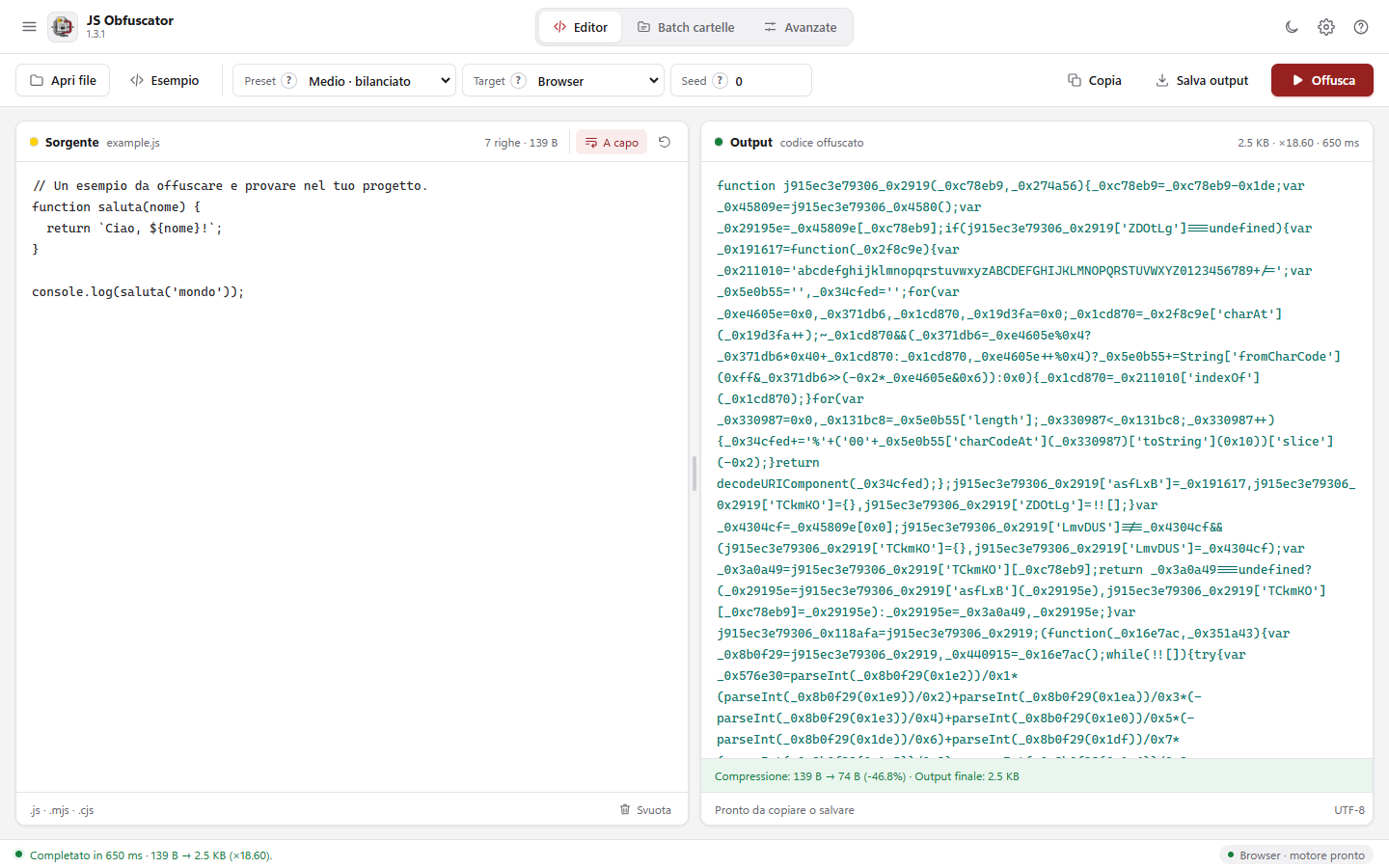
Sorgente e output affiancatiSource and output side by side

Preset Medio: il codice viene prima compresso e poi offuscato, con statistiche di compressione, dimensione finale e tempo nella barra di stato.Medium preset: the code is minified first and then obfuscated, with minification statistics, final size and time in the status bar.

JS Obfuscator - impostazioni avanzate con tema scuro

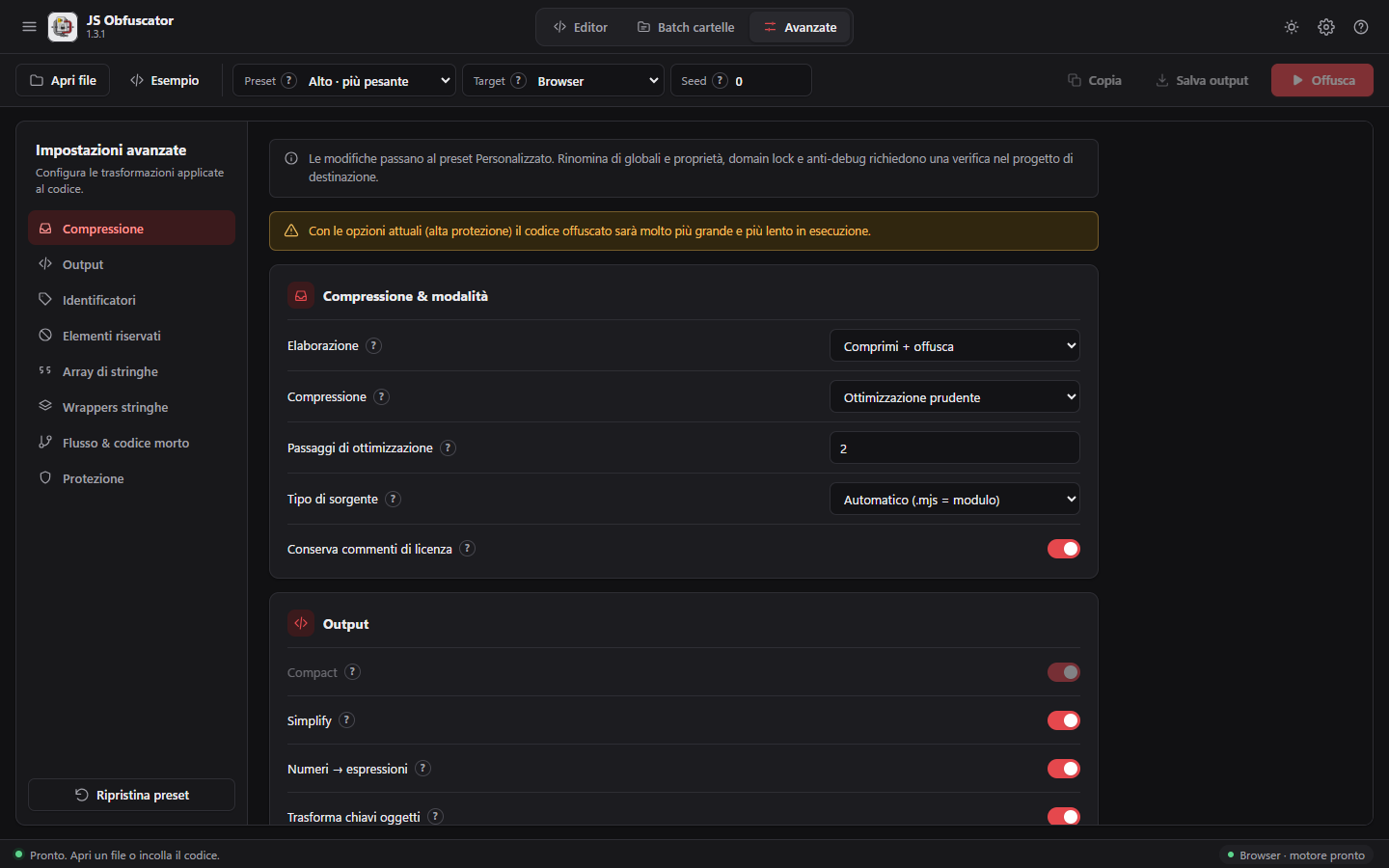
Impostazioni avanzateAdvanced settings

Le opzioni sono divise per sezione, con una spiegazione per ognuna; con il preset Alto l'app avvisa che l'output sarà più grande e più lento.Options are grouped by section, each with an explanation; with the High preset the app warns that the output will be larger and slower.

JS Obfuscator - modalità solo compressione con tema scuro

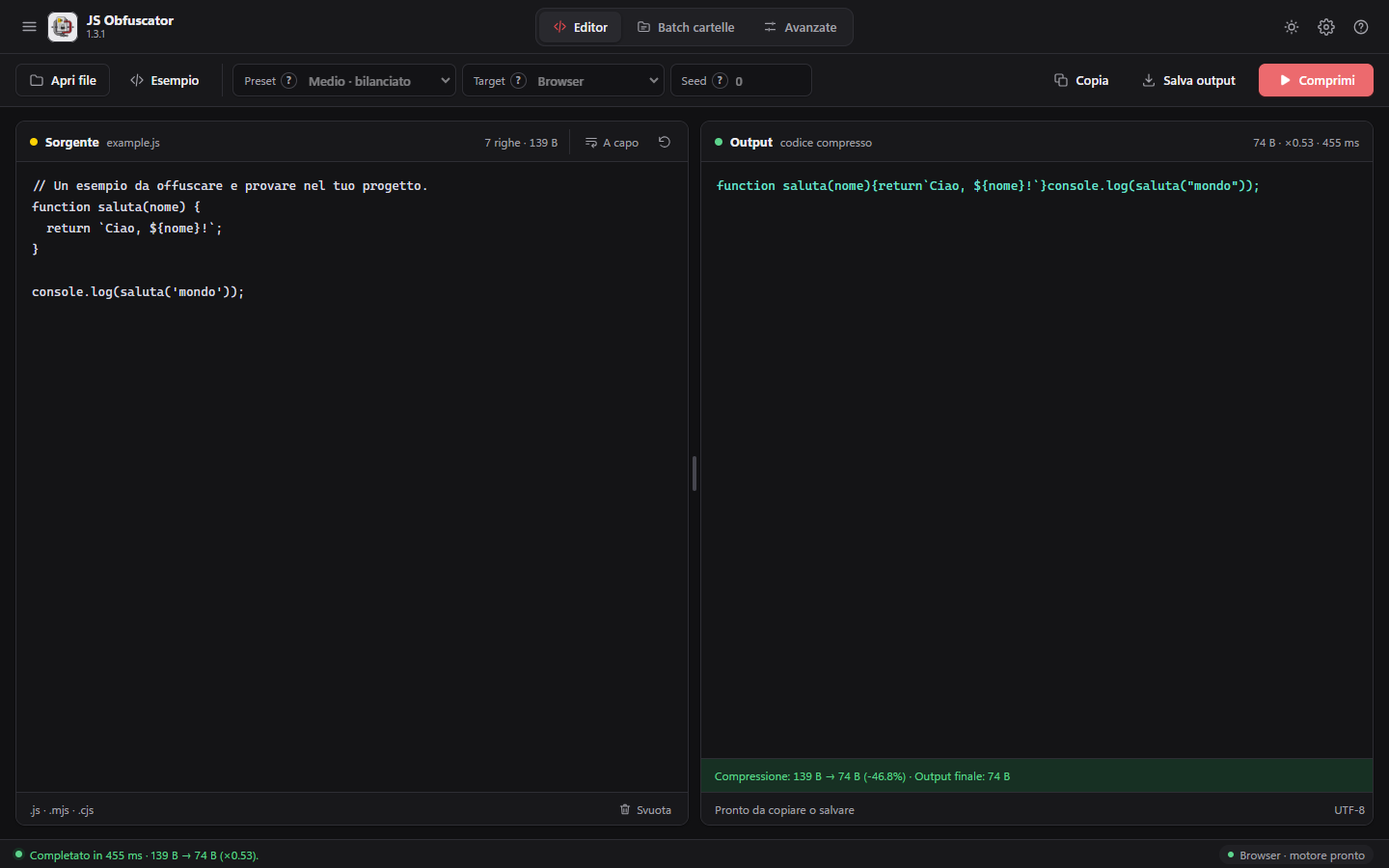
Solo compressioneMinify only

Quando serve solo un file più leggero: il codice perde quasi metà dei byte e resta eseguibile così com'è.When you only need a lighter file: the code loses almost half its bytes and stays runnable as it is.

Download

Scarica JS ObfuscatorDownload JS Obfuscator

Windows - ZIP portabileWindows - Portable ZIP

Scarica l'archivio ZIP, estrai l'eseguibile in una cartella e avvialo: nessuna installazione, le risorse sono incorporate. Richiede Windows 10 o 11 a 64 bit con Microsoft Edge WebView2 (già presente in Windows 11). Nel pacchetto trovi anche documentazione e licenze dei componenti. Interfaccia in italiano e inglese. Download the ZIP archive, extract the executable to a folder and run it: no installation, resources are embedded. Requires 64-bit Windows 10 or 11 with Microsoft Edge WebView2 (already included in Windows 11). The package also contains documentation and component licenses. Italian and English user interface.

Scarica JS Obfuscator per WindowsDownload JS Obfuscator for Windows

Prima di distribuireBefore you ship

L'offuscamento rende il codice più difficile da leggere, non impossibile: non sostituisce la protezione lato server. Verifica sempre l'output nel progetto di destinazione, soprattutto con rinomina di globali e proprietà, domain lock, anti-debug e self-defending. TypeScript va compilato in JavaScript prima di importarlo. Obfuscation makes code harder to read, not impossible: it doesn't replace server-side protection. Always test the output in the target project, especially with global and property renaming, domain lock, anti-debug and self-defending. TypeScript must be compiled to JavaScript before importing it.